Showing posts with label Windows. Show all posts

Understanding the Impact of Apache Log4j Vulnerability

 More than 35,000 Java packages, amounting to over 8% of the Maven Central repository (the most significant Java package repository), have been impacted by the recently disclosed log4j vulnerabilities (1, 2), with widespread fallout across the software industry. The vulnerabilities allow an attacker to perform remote code execution by exploiting the insecure JNDI lookups feature exposed by the logging library log4j. This exploitable feature was enabled by default in many versions of the library.

This vulnerability has captivated the information security ecosystem since its disclosure on December 9th because of both its severity and widespread impact. As a popular logging tool, log4j is used by tens of thousands of software packages (known as artifacts in the Java ecosystem) and projects across the software industry. User’s lack of visibility into their dependencies and transitive dependencies has made patching difficult; it has also made it difficult to determine the full blast radius of this vulnerability. Using Open Source Insights, a project to help understand open source dependencies, we surveyed all versions of all artifacts in the Maven Central Repository to determine the scope of the issue in the open source ecosystem of JVM based languages, and to track the ongoing efforts to mitigate the affected packages.

How widespread is the log4j vulnerability?

As of December 16, 2021, we found that 35,863 of the available Java artifacts from Maven Central depend on the affected log4j code. This means that more than 8% of all packages on Maven Central have at least one version that is impacted by this vulnerability. (These numbers do not encompass all Java packages, such as directly distributed binaries, but Maven Central is a strong proxy for the state of the ecosystem.)

As far as ecosystem impact goes, 8% is enormous. The average ecosystem impact of advisories affecting Maven Central is 2%, with the median less than 0.1%.


Direct dependencies account for around 7,000 of the affected artifacts, meaning that any of its versions depend upon an affected version of log4j-core or log4j-api, as described in the CVEs. The majority of affected artifacts come from indirect dependencies (that is, the dependencies of one’s own dependencies), meaning log4j is not explicitly defined as a dependency of the artifact, but gets pulled in as a transitive dependency.


What is the current progress in fixing the open source JVM ecosystem?

We counted an artifact as fixed if the artifact had at least one version affected and has released a greater stable version (according to semantic versioning) that is unaffected. An artifact affected by log4j is considered fixed if it has updated to 2.16.0 or removed its dependency on log4j altogether.

At the time of writing, nearly five thousand of the affected artifacts have been fixed. This represents a rapid response and mammoth effort both by the log4j maintainers and the wider community of open source consumers.

That leaves over 30,000 artifacts affected, many of which are dependent on another artifact to patch (the transitive dependency) and are likely blocked.


Why is fixing the JVM ecosystem hard?

Most artifacts that depend on log4j do so indirectly. The deeper the vulnerability is in a dependency chain, the more steps are required for it to be fixed. The following diagram shows a histogram of how deeply an affected log4j package (core or api) first appears in consumers dependency graphs. For greater than 80% of the packages, the vulnerability is more than one level deep, with a majority affected five levels down (and some as many as nine levels down). These packages will require fixes throughout all parts of the tree, starting from the deepest dependencies first.


Another difficulty is caused by ecosystem-level choices in the dependency resolution algorithm and requirement specification conventions.
In the Java ecosystem, it’s common practice to specify “soft” version requirements — exact versions that are used by the resolution algorithm if no other version of the same package appears earlier in the dependency graph. Propagating a fix often requires explicit action by the maintainers to update the dependency requirements to a patched version.
This practice is in contrast to other ecosystems, such as npm, where it’s common for developers to specify open ranges for dependency requirements. Open ranges allow the resolution algorithm to select the most recently released version that satisfies dependency requirements, thereby pulling in new fixes. Consumers can get a patched version on the next build after the patch is available, which propagates up the dependencies quickly. (This approach is not without its drawbacks; pulling in new fixes can also pull in new problems.)

How long will it take for this vulnerability to be fixed across the entire ecosystem?
It’s hard to say. We looked at all publicly disclosed critical advisories affecting Maven packages to get a sense of how quickly other vulnerabilities have been fully addressed. Less than half (48%) of the artifacts affected by a vulnerability have been fixed, so we might be in for a long wait, likely years.
But things are looking promising on the log4j front. After less than a week, 4,620 affected artifacts (~13%) have been fixed. This, more than any other stat, speaks to the massive effort by open source maintainers, information security teams and consumers across the globe.

Where to focus next?
Thanks and congratulations are due to the open source maintainers and consumers who have already upgraded their versions of log4j. As part of our investigation, we pulled together a list of 500 affected packages with some of the highest transitive usage. If you are a maintainer or user helping with the patching effort, prioritizing these packages could maximize your impact and unblock more of the community.
We encourage the open source community to continue to strengthen security in these packages by enabling automated dependency updates and adding security mitigations. Improvements such as these could qualify for financial rewards from the Secure Open Source Rewards program.
You can explore your package dependencies and their vulnerabilities by using Open Source Insights.


Microsoft is finally retiring Internet Explorer in 2022

 Internet Explorer will no longer be supported in June 2022


Microsoft is finally retiring Internet Explorer next year, after more than 25 years. The aging web browser has largely been unused by most consumers for years, but Microsoft is putting the final nail in the Internet Explorer coffin on June 15th, 2022, by retiring it in favor of Microsoft Edge.

“We are announcing that the future of Internet Explorer on Windows 10 is in Microsoft Edge,” says Sean Lyndersay, a Microsoft Edge program manager. “The Internet Explorer 11 desktop application will be retired and go out of support on June 15, 2022, for certain versions of Windows 10.”

While the Long-Term Servicing Channel (LTSC) of Windows 10 will still include Internet Explorer next year, all consumer versions will end support of the browser. Microsoft doesn’t make it clear (and we’re checking), but it’s likely that we’ll finally see the end of Internet Explorer being bundled in Windows either in June 2022 or soon after.

Internet Explorer originally launched in 1995

The alternative for most businesses will be Microsoft Edge with IE mode. Microsoft created its IE mode for Edge a couple of years ago, and it has allowed businesses to adopt the new Chromium-based browser for older legacy websites. IE mode supports older ActiveX controls and legacy sites, which are surprisingly still used by many businesses. Microsoft is promising to support this IE mode in Edge until through at least 2029.

The end of Internet Explorer has been a long time coming. Microsoft ended support for Internet Explorer 11 for the Microsoft Teams web app last year, and it’s planning to cut it off from accessing Microsoft 365 services later this year. Internet Explorer 11 will no longer be supported for Microsoft’s online services like Office 365, OneDrive, Outlook, and more on August 17th.

Microsoft has also been trying to stop people from using Internet Explorer for more than five years. Microsoft Edge first appeared in 2015, and it kicked off the end of the Internet Explorer brand. Microsoft has since labeled Internet Explorer a “compatibility solution” rather than a browser and encouraged businesses to stop using the aging browser in favor of Edge and its IE mode.

Microsoft is pushing the Control Panel aside in its latest Windows 11 updates

 One more step to simplifying Windows

Microsoft is finally signaling the end of the legacy Control Panel in Windows 11. The software giant introduced a number of changes in its Settings section of Windows 11 earlier this year, and this month the company has started testing even more ways to replace Control Panel functionality.

In new test versions of Windows 11, Microsoft has moved the advanced network settings into a new page in the Settings app, which includes sharing options for folders, printers, and network discovery options. Some entry points to the network and device settings in Windows 11 also now redirect to the Settings app, instead of forcing you into the Control Panel.

Elsewhere, links to the section of the Control Panel used to uninstall apps now redirect to the Settings app. Even the section for uninstalling Windows Updates is now part of the Settings app, instead of being housed in the Control Panel.

These latest changes are welcome, and come after attempts to move away from the Control Panel in Windows 10. Microsoft originally introduced a separate Settings app in Windows 8, as a way to overhaul its traditional Control Panel. The two have existed alongside each other for legacy support reasons, just like how Microsoft had two browsers (Internet Explorer and Microsoft Edge) inside Windows 10.

The Settings app was designed to be a new broom that sweeps clean, but there are still plenty of settings that require you to head into the Control Panel. Windows 10 improved things, and Windows 11 offers an even more modern take on how users control their PC.

Microsoft describes these latest changes as an “ongoing effort to bring over settings from Control Panel into the Settings app.” So it’s clear Microsoft is committed to cleaning this area of Windows up, and eventually making the Control Panel redundant.

Windows 11 has largely been an attempt to modernize and simplify a Windows operating system that has been used the same way for decades. Microsoft didn’t quite go far enough with the Control Panel for the initial release of Windows 11, but in other areas like the taskbar it has simplified things far too much. These monthly changes pave the way for Microsoft to finalize what has felt like an unfinished version of Windows so far.

How To Fix The Memory Management Error In Windows 10

 Memory_Management  is one of the most unhelpful phrases that Microsoft suggests you search for if you run into a BSOD (Blue Screen of Death) error while running Windows 10. So, how do you fix the memory management issue?

Window 10

The first step in fixing any computer problem is isolating the issue’s source, so you know what to fix. With Window’s ominous errors, such as this one, it may be challenging to know where to begin.

Basic troubleshooting is essential to finding your memory management error. Let’s take a look at what you can do to get this fixed.

Step 1: Run Windows 10 in Safe Mode

The first thing you should do is launch Windows 10 in safe mode with basic drivers. This action allows you to check whether you still receive the BSOD Memory Management error. Essentially, this shuts down any processes the computer doesn’t need. If the memory management error ceases, you’ll know it isn’t hardware but rather something in the software, such as a patch in an update or a driver. If the problem still occurs, you may need to replace some faulty hardware. To boot your system in Safe Mode, follow the steps below.

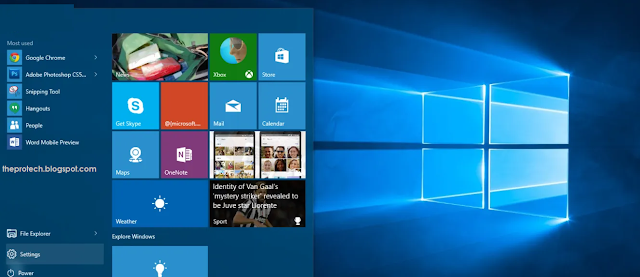
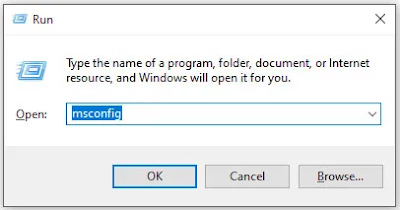
  1. Use the Win+R keyboard shortcut and type “msconfig“ without quotes, then hit “enter.”

Run Command

    2.    Tap the “Boot” tab in the upper section of the screen.

    3.Select “Safe Boot.”


    4.Choose “Minimal” from the list of boot options.


Step 2: Run Windows Memory Diagnostic

The Windows Memory Diagnostic tool will test your SDRAM and report any problems it finds—if any at all. This step should use Safe Mode to prevent the BSOD issues you experience. However, this requirement is after affirming that your PC worked correctly in Safe Mode using Step 1 above.

  1. Press the “Windows + R” keyboard combination and type “mdsched” without quotes, then press “Enter” or click “OK.”

     2.Select the option to restart and run a check for SDRAM problems.


Upon restart, you will receive a report letting you know if you’re having a memory issue.

As the name suggests, the memory management error relates to the computer’s memory, which can be a physical problem with the installed RAM. The Windows Memory Diagnostic Tool can help discover if this is the root of the problem.

When Windows restarts, it will tell you if there is something wrong with your memory. If there is, then you’ll have to either replace the RAM yourself or send back your computer if it’s under warranty.

Step 3: Run SFC Scanner
SFC Scanner is a Microsoft tool for detecting various problems with your system, and running it seems to have solved some people’s memory management woes. Once again, this step should also be performed in Safe Mode like Step 1 and Step 2 above.

  1. In the Cortana search bar, type “cmd” without quotes, then click on “Run as administrator” in the right panel for the Command Prompt. You can’t use the right-click Start Menu option anymore since Powershell replaced Command Prompt.

    2.Once the Command Prompt opens, type “sfc/scannow” without quotes and press “Enter.”

SFC Scanner will now run through your system, seeing if it finds any disk errors to fix. Even if it doesn’t find anything, some users have found that their computers play nicer after a full scan.

Note: It is best to perform two or three rounds of scanning since the process doesn’t always detect anything on the first attempt or fixes something else and needs to find more issues.

Step 4: Look for Software Problems
Software problems are a little more challenging to pin down. Still, if the memory management error is a relatively new phenomenon, you could try undoing some of your recent software installations to see if it fixes the problem.

Specific pieces of software often link to memory management errors. You can try disabling and re-enabling newer software to see if that fixes the BSOD, or you can reload Windows 10 entirely (although this is a nuclear option).

Isolating and correcting a software issue or even a corrupted file can take a while, but it’s certainly worth it if you’re not entirely sure you’re experiencing a hardware failure.

Step 5: Update Your Graphics Card Drivers
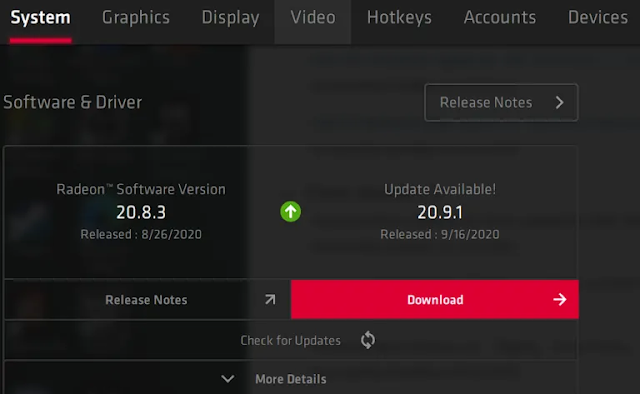
One of the most common causes of the memory management error in Windows 10 is outdated or broken graphics card drivers. This scenario makes sense, especially since the graphics card has memory too. If you’re not running the latest version, try installing the newest available.

If you already have the latest drivers, try the “uninstall/reinstall” method. Sometimes, a driver is broken or corrupt but goes undetected. The drivers you need will depend on your graphics card, of course. Windows 10 will be able to tell you what you have in your system, but it’s likely to be onboard Intel graphics or something from Nvidia or AMD. External video cards have more memory than onboard graphics, and they are more prone to overheating.
Graphic Information

Visit the website of the manufacturer and download any updates to get your system working correctly again.

Step 6: Upgrade Your PC’s Hardware
Depending on the results of your troubleshooting adventures, it may be time to upgrade some of your system’s hardware. As software and PC technology progress, so does hardware requirements.

Before rushing out to buy new hardware, check to ensure that everything in the case is seated correctly. Perhaps you recently moved your machine, and something came loose, or your hardware could use a thorough cleaning.

If it’s a machine that you’ve built or one that is out-of-warranty, it’s time to look for new components to get your computer up and running again. It may be an opportunity for a new graphics card, or you may need more RAM. Whatever the case, if you’ve tried everything above and the issue persists, it’s likely hardware-related.

(Activate Now)How To Activate Jio Prime Membership

Jio Prime Activation: Hi There and Welcome to The Protech. Form today onwards subscription or activation for Jio Prime Membership has begin only till 31 March 17. So don't waste your time.
Follow these 3 methods listed below and activate your Jio Prime Membership.
 Prime Membership Plan Benefits

1. Daily 1GB 4G Data (Unlimited At 256 Kb).

2. Daily 1GB 4G Wifi Data At Rs 10.

3. Unlimited Voice Calls And Unlimited SMS (100 SMS) Daily.

4. Unlimited Usage Of Jio Videos,Movies,Apps Subscription worth Rs.10000.

Beware! Don't Fall For "Font Wasn't Found" Google Chrome Malware Scam


Next time when you accidentally or curiously land up on a website with jumbled content prompting you to download a missing font to read the blog by updating the Chrome font pack…
…Just Don't Download and Install It. It's a Trap!

Scammers and hackers are targeting Google Chrome users with this new hacking scam that's incredibly easy to fall for, prompting users to download a fake Google Chrome font pack update just to trick them into installing malware on their systems.

10 Data Recovery Tools You Can Download For Free [Windows]

It happens to the best of us. We are working on that very important file when suddenly disaster strikes. It accidently gets deleted, corrupted, the computer died or a number of unfortunate things that prevent you from gaining access to the file. What’s worse, you don’t have a backup and are in desperate need of those important files urgently.

Well, don’t fret as it is possible to recover those deleted files. When you delete a file, you don’t actually ‘delete’ it. The system marks the area the file resides as reusable, removing the file from its index. This means that there is a period where it is possible to restore the file. To help you with your deleted data dilemma, we have for you 10 free data recovery tools for Windows, which will help from simple file recovery to a total partition rescue.
1. PhotoRec

PhotoRec is a powerful command line recovery tool that can recover your lost data by bypassing the file system, perfect for when your computer can see the drive but cannot access it or for use on a formatted drive. The app will work on different drive formats other than the ones used by Windows, including those used on OS X, and is also available on multiple platforms.
[Download here]

2. Recuva
Recuva provides a number of tools and features that makes recovering your data easier. The app will deep scan your drives and with it, you can recover deleted data on your drive or from drives that are damaged or formatted. It has the ability to recover data that was accidently deleted from certain apps such as your email program or the temp folder of Microsoft Word, useful when the power cuts off and you haven’t saved your progress. If the options seem too overwhelming, there is a wizard to guide you through the process.
[Download here]

10 Data Recovery Tools You Can Download For Free [Windows]

It happens to the best of us. We are working on that very important file when suddenly disaster strikes. It accidently gets deleted, corrupted, the computer died or a number of unfortunate things that prevent you from gaining access to the file. What’s worse, you don’t have a backup and are in desperate need of those important files urgently.

Well, don’t fret as it is possible to recover those deleted files. When you delete a file, you don’t actually ‘delete’ it. The system marks the area the file resides as reusable, removing the file from its index. This means that there is a period where it is possible to restore the file. To help you with your deleted data dilemma, we have for you 10 free data recovery tools for Windows, which will help from simple file recovery to a total partition rescue.
1. PhotoRec

PhotoRec is a powerful command line recovery tool that can recover your lost data by bypassing the file system, perfect for when your computer can see the drive but cannot access it or for use on a formatted drive. The app will work on different drive formats other than the ones used by Windows, including those used on OS X, and is also available on multiple platforms.
[Download here]

2. Recuva
Recuva provides a number of tools and features that makes recovering your data easier. The app will deep scan your drives and with it, you can recover deleted data on your drive or from drives that are damaged or formatted. It has the ability to recover data that was accidently deleted from certain apps such as your email program or the temp folder of Microsoft Word, useful when the power cuts off and you haven’t saved your progress. If the options seem too overwhelming, there is a wizard to guide you through the process.
[Download here]

12 Interesting Computer Facts

Friends today we will highlight 12 interesting computer Facts that you might not be knowing it before,
lets see them now.
 1)Over 6,000 new computer viruses are released every month.

2)The first computer mouse, constructed in 1964, was made out of wood.(by Doug Engelbart)

3)The average human being blinks 20 times a minute – but only 7 times a minute when using a computer.

4)The first electro-mechanical computer was developed in 1939.

Free Microsoft Windows for the Internet of Things and Mobile Devices


Today, 8th April could be a sad day for all those who are still using Windows XP, as it is an official assassination day of it, but there is also a good news that Microsoft is going to stop charging for its Windows Operating System on on the devices with screens smaller than nine inches.
Yes, Free a Windows OS for the Internet of Things (IoTs), such as Mobile Devices, Smart thermostats, Smart TVs, wearable devices etc., that was announced by Microsoft at Build 2014 conference on Wednesday.
“To accelerate the creation of great mobile devices running Windows and grow our number of users, we announced today that Windows will be available for $0 to hardware partners for Windows Phones and tablets smaller than 9” in size,” said Terry Myerson, executive vice president, OS Group at Microsoft and he also added that it will include a one-year subscription to Office 365.
FREE, BUT NOT OPEN SOURCE
Free Windows, means the manufacturers of small tablets, phones and any other small devices won't have to buy a license from Microsoft.
According to Microsoft, Windows for Internet of Things will use the same code base as Windows Phone 8, which will run only the mobile apps, not any desktop software, and also they didn't mention about open sourcing the code base of Windows for IoTs, as Google’s Android.
The reason behind it may be in an effort to make it tough for hackers to exploit the operating system and to ensure the code is sound and secure.
Distributing free Windows could be a prominent step, but it’s one that Microsoft needed to take earlier, because Google’s free mobile operating system - Android is used widespread among the consumer electronics devices. The reason Microsoft required to move on to some strategic approach is to catch up with Google's Android and Apple's iOS operating systems.
Since, Google’s android is an open source, which is freely available to everyone, so anyone can use it without paying a single penny and even Apple is also pushing itself hard to bring its operating system prices towards zero.
But, on the other hand, Microsoft is charging $10 for its Windows Phone operating system on each Smartphone and tablet, which made existence toilful for Microsoft in recent years. So, to boost its monopoly in the world of smart devices, Microsoft took a tremendous move in a right direction.
The new update will definitely help Microsoft to beef up its app marketplace, as it allows developers to build apps for Windows 8.1 tablets, as well as for Windows Phone 8.1 Devices.
WINDOWS PHONE 8.1
In addition, Microsoft has also announced the next version of the Windows Phone operating system, Windows Phone 8.1, which comes with several new features, including the voice controlled Cortana digital assistant.
Cortana is named after a female character in Microsoft's Halo video game, and is aimed as a competitor to Apple's Siri for iOS. Microsoft said Cortana can interact with third-party Windows Phone apps such Skype, Hulu Plus, Facebook and Twitter, all of which can be controlled via voice commands.

Stratasys launches multi-material colour 3D printer

                      The new $330,000 printer is targeted at industrial designers and manufacturers
The world's first multi-material full-colour 3D printer has been launched by Stratasys, the owner of the MakerBot range of printers.

It features "triple-jetting" technology that combines droplets of three base materials, reducing the need for separate print runs and painting.

The company said the Objet500 Connex3 Color Mutli-material 3D Printer would be a "significant time-saver" for designers and manufacturers.

Download WhatsApp for PC [Guide to use WhatsApp on Computer - 7/8/Vista/XP]

WhatsApp for PC! Many of you might be wondering but now you can actually make use of WhatsApp on Windows platforms and in the due course of this article, we would be providing a complete Guide to use WhatsApp on PC.

You are interested in this title pretty much implies that you are addicted to or are keen to use WhatsApp for PC  since you are probably not comfortable using WhatsApp in your 4 or 5 inch touch screen smartphone. Well, if that is the case, join the club. I too find it so pestering to get my fingers around those little buttons. Darn it!

Good for people like us; we’ve got an alternative to using WhatsApp on PC other than on an Android, Symbain, Blackberry or on an iOS. One can effectively use WhatsApp on PC, just like on any one of the above mentioned handheld devices. Indeed, with much more comfort! Technology has an answer for every problem. Just that, tech offers two answers for this one.
Fine; I’ll not keep you waiting anymore. Let’s jump right into the business of how to download WhatsApp for PC and use it that way. Make sure you follow the instructions carefully for downloading WhatsApp for PC.

Guide to use WhatsApp on PC:

In this how to use WhatsApp for PC tutorial, I’d be helping you download WhatsApp for PC in two distinct methods with screenshots. Both the methods help to install WhatsApp on PC with equal ease. So you can go for either. Both work well in my case.
  1. Download and Install WhatsApp for PC using BlueStacks.
  2. Download and Install WhatsApp for PC using Wassapp.

Method 1:Download WhatsApp for PC Using Bluestacks

BlueStack is an Android emulator that lets us install and use almost all Android apps and games on a PC.  This is how we’ll avail WhatsApp for PC using this android emulator. It is not just on PC that you can take advantage of BlueStack, but also on a MAC. When it comes to PC, BlueStack works on all widely deployed operating systems i.e., Windows XP, Windows Vista,Windows 7, and Windows 8.
Step 1: Get BlueStack from here and install it on your PC.

Step 2: Upon installation, open BlueStack. You’d find a welcome screen showing the top 25 Apps.
Step 3: Navigate to the My Apps tab next to top 25 Apps. You will find the apps that are downloaded by default here.
Step 4: In the same screen select App Search, wherein you’d be searching for the WhatsApp app.
Step 5: In the search bar that appears, type WhatsApp or WhatsApp for PC. The search engine searches for the keyword in Google Play, one mobile and the Amazon App Store, and shows a search result from all three stores.
Step 6: Select WhatsApp Messenger from the 1 mobile store. You then need to click install button against WhatsApp Messenger in the screen that follows.


Once done, BlueStack downloads WhatsApp for you. It takes about 2 minutes for this to happen.
Step 7: You will now find WhatsApp installed in you ‘My Apps’ tab. You are just one step behind; i.e., configuring your WhatsApp account.
Step 8: Open WhatsApp and click I agree with terms button.
Step 9: You then have to select your nation and put in your mobile number and say Ok.
Step 10: WhatsApp will now send you a SMS or Voice verification. You just got to enter the code you get via the SMS of voice call from WhatsApp.

Voila! You are now done with a fresh WhatsApp installation on your PC.  You’ve learnt to use WhatsApp for PC using Bluestacks App Player.

Hack Windows using winAUTOPWN 3.4 –Completing 4 years of windows hacking

winAUTOPWN has been an old favourite to automate windows hacking and vulnerability testing.  The project is the brainchild of Azim Poonawala of [C4]Closed Circuit Corporate Clandestine and saw its first release in 2009. Fast forward to 4 years; it has matured into a good exploitation framework with a plethora of options. As the Author states about it  -

Autohack your targets - even if you have consumed and holding a bottle of 'ABSOLUT' in one hand and absolute ease (winAUTOPWN) in the other.

In layman terms, winAUTOPWN is a unique exploit framework which helps in gaining shell access and pwning (aka exploiting vulnerabilities) to conduct Remote Command Execution, Remote File/Shell Upload, Remote File Inclusion and other Web-Application attacks. To add cherry on the top, it can also help in conducting multiple types of Denial of Service attacks on targets, furthermore, It can also be used to test effectiveness of IDS/IPS 

Apple's iCloud is another networking failure


When Apple announced that it was moving into cloud based computing, the Tame Apple Press enthused about it so loudly the more sceptical voices were shouted down.
The reason there were sceptics was because while Apple gear might look sexy, its networking capability was legendarily pants. Right from its early days, Apple's networking solutions were incredibly unreliable.
Anyone who had to suffer through the 1990s on AppleTalk who had not been reduced to a gibbering wreck was unlikely to trust Jobs' Mob networking technology ever again.
Things did not get better either. From Apple server to AirPort, Jobs' Mob seemed to be light years behind networking on other computing. When Steve Jobs returned, the inconsistency was made it even more unpleasant by the fact that every bit of networking gear was peddled with the same smugness as its consumer gear.

Shortcut Keys of Windows 8 (its time to speed up your workflow)


Using Shortcut keys is an integral part of your work if you want to do it fast. like in Ms word if you use shortcut keys (e.g. pressing CTRL+N for opening a file is fast than click on menus to accomplish  this task) it increases your speed of workflow dramatically. Same like in operating system, if you use shortcut keys definitely it increases your speed of work. So today I am going to share with you the shortcut keys of windows 8 (in case of windows8 shortcut keys becomes more handy because of introducing METRO and other features like quick search ) which superbly facilitate you to do your work faster than before. So let’s get started…

Windows XP Hangs At Shutdown Screen


Note: Before perform following steps you need to take backup 
start > run > type regedit > press enter > go to file menu > click on export> save in any place as you want like desktop or c:/

Step1: Open REGEDIT and navigate to ‘HKEY_CURRENT_USER\Control Panel\Desktop\’
Highlight the ‘WaitToKillAppTimeout’ value.
Set it to ‘1000′.
Now highlight the ‘HungAppTimeout’ value
Set it to ‘1000′ also.
The second part of this tip changes the same settings, this time for all users on the system.
Step2: Open REGEDIT and navigate to ‘HKEY_USERS\.DEFAULT\Control
Panel\Desktop’
Highlight the ‘WaitToKillAppTimeout’ value.
Set it to ‘1000′.
Now highlight the ‘HungAppTimeout’ value.
Set it to ‘1000′ also.

How To Design A Logo : The Ultimate guide


What is a Logo?A logo is a graphic mark or graphic representation or symbol, icon of the name of the organization . A logo designing is very important and one of the difficult part of the graphic designing in meaning of creating a unique and original designing. A professional logo can be design to enhance the meaning of a company, an organization, or a product There are several type of inventions and techniques have contributed in logo designing. A logo is important part of business of any single owner or company. It’s identify your business and products from other similar businesses and help the customers to reach the exact place where they want to go.
How To design a Logo?
Every designer have their own techniques and method to design a logo but some steps which every designer follow are mention here. Designing a good logo is not a simple task and requires a lot of involvement from the marketing team and the design agency. If you re designing a logo for your client then first of all you need to discuss with your client about the logo type and briefly discuss about the business and their products. If you can search in detail about the company and logo then its easy for you to design a logo. You can also search about the market trends and check the logos of other similar companies. A complete detail about the logo is is helpful create a unique and perfect design. You should also try and incorporate your business name, message or sell line. 

4-D Printing: The Invention that Built Itself?


The latest advance in 3-D printing technology might make it possible for underwater structures to build themselves. So-called “4-D printing” is being used by researchers to create materials that transform into geometrical structures all on their own.
Skylar Tibbits, a trained architect and computer scientist at M.I.T., recently announced to the audience at this year’s TED Conference that he’s working with 3-D printing company Stratasys to create this entirely new kind of building material, which, when exposed to an energy source, canfold itself into pre-programmed shapes.
The New York Times technology blog, Bits, reports that the self-folding structures are made of two core materials, a synthetic polymer that doubles in volume when submerged in water, and another polymer that remains rigid in water. When the two polymers are combined and submerged, the expansion of the first polymer drives the joints of the structure to move, creating a preprogramed shape, like this simple cube.
Tibbits and his team at the M.I.T. self-assembly lab believe that this technology will eventually be used to create much larger, more complicated structures. And since the materials being researched can also be activated by light, heat, and sound, companies who adopt this new technology will be able to use a variety of energy sources to create these self-building structures.
Be Sociable,Share!

25 websites to watch/download Bollywood movies online free


Bollywood is the biggest entertainment industry in India. Every year many movies are created and released in India thanks to Bollywood. If you are in mood to watch any movie, you can visit your nearby theatre or the best way is to watch Bollywood movie onlinefor free. There are many such websites on  web offering service to watch/download Bollywood movies online for free. Inorder to help you to select from such websites, I have prepared a list of 25 such best sites which you can trust to watch Bollywood movies online.
Watch Bollywood movies online free:
Many of these sites not only allow you to watch Bollywood movies online for free, but also you can download movies from their servers. Check out the list below:


Hacking Dominos Coupon Generator – Free Dominos Pizza Coupons & Discounts


After multiple failed attempts to place an order of pizza and getting tired of taking follow-ups from folks at Axis Bank and Bill Desk (the gateway that  takes care of Dominos's online pizza orders) , I was frustrated a lot. Then , I came across Domino's Slot machine coupon generator. An innocent looking random coupon generator that is purely JS based and is easily hackable. NOW I AM NOT SAYING I HACKED IT AND ORDERED FREE PIZZA's , the payment gateway sucks soo much that I didn't ordered anything. But yes, I do have something to share with you.
Fire up your Google Chrome (that's enough) and open
http://pizzaonline.dominos.co.in/slot-machine/process-slot.php
You will see the Coupon Generator, fill in the captcha and play it, in normal circumstances , chances are -
You will win a coupon , if you are feeling lucky, you can try once more and then if you win again, you will have to deal with the final discount coupon you get.
You will get a "Try Again", you can try till the case 1 is fulfilled.

 
Design by gitstein | Bloggerized by Kuldeep