Showing posts with label Download. Show all posts

How to Capture a Scrolling Screenshot in Windows 10


Scrolling image

Windows 10 offers many ways to capture a screenshot. To take a screenshot, all you need to do is press Ctrl + PRTSC or Fn + PRTSC and you instantly have a screenshot. There is even a built-in Snipping Tool that allows you to capture a section of a window as well as pop-up menus.

But all those methods only allow you to capture content that is within the dimensions of the browser’s viewing area. What if you want to capture a screenshot of a scrolling window of a webpage, document, or any other content that’s beyond the viewable area? In such cases your only option would be to use a third-party application

In this post you’ll learn the best tools to capture a scrolling screenshot in Windows.

1. ShareX

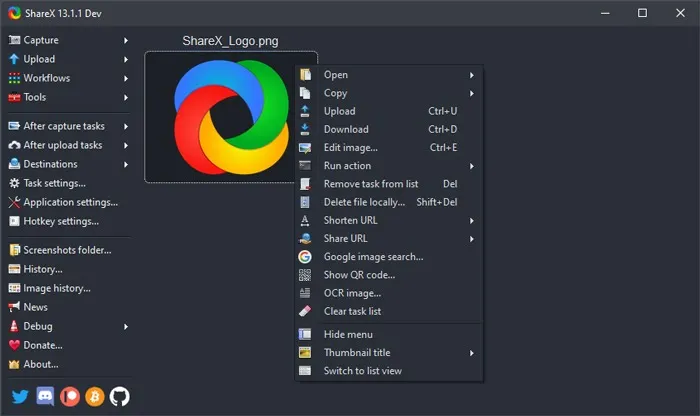
Available to buy on its own website as well as the Steam gaming platform (where it has “Overwhelmingly Positive” reviews, as well as having its own well-populated Discord channel, the free screen capture app ShareX is validated by its broad popularity in the discerning game-streaming community.
ShareX

The open-source app is widely used by gamers for its robust screen-capture options. Among those features – which include video capture, GIFs, region-select, workflows, as well as a huge number of filters and effects to add to your captures – is the “scrolling screenshot” option you’re looking for here.

Just open ShareX, click Capture then “Scrolling capture”. Once you select your region, you can specify which window you want to scroll, whether you want there to be a delay before the screen-capture starts, and how many scrolls you want to capture.

It’s nice and easy to use, and unlike other options on this list it’s free without caveats, maintained as it is by a diligent community of open-source developers. Beyond just scrolling, it also functions as an all-in-one screen capture suite, which is pretty impressive given its small file size.

2. PicPick

PicPick is a robust screen-capture and image-editing software developed and owned by NGWIN. It’s my personal favorite screen capture tool, and I use it all the time. The best thing about PicPick is that it’s free for personal use and packs some cool features you won’t find even in the paid programs.
PicPick

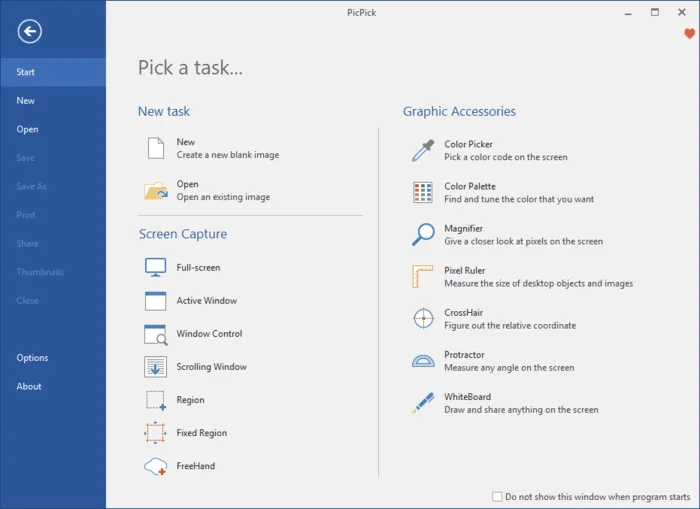
As far as screen capture is concerned, PicPick offers seven screen capture modes: Full screen, Active Window, Window Control, Scrolling Window, Region, Fixed Region, and FreeHand. Each of these modes suits different scenarios and can help you customize your screenshots to your liking. For example, the Region mode can help you to isolate and capture a dialogue box without background noise.

Fixed Region mode allows you to set your desired screenshot length and width in terms of pixel count which helps to ensure all your screenshots are uniform. It also has a Scrolling Window mode that lets you capture a scrolling screenshot of a webpage or a document in just a few clicks.

PicPick Options

To capture a scrolling window, follow the steps below:

1. Press and hold Ctrl + Alt together, then press PRTSC. A rectangular box highlighted in red will appear.

2. Press and hold the left mouse button, then drag the mouse on the scrolling window to select the area.

3. Release the mouse click and an auto-scroll will happen slowly. After that, your entire window will be captured in just a few seconds.

PicPick also comes with a pixel ruler which can be used to measure the size of images that are displayed on your screen, a virtual whiteboard that allows users to draw on the screen, and crosshairs for pinpointing the positions of relative pixels.

3.Snagit

Snagit is a popular screenshot-capture and video-recording software created and distributed by TechSmith. It features a sleek interface that is more focused than PicPicks.

Snagit
    

It also boasts of superior image-editing functionalities that are more polished than those of PicPicks. However, Snagit is not free and costs $50 per license, which is relatively high.

Because the main focus of Snagit is on screenshot capture, it comes with advanced screen capturing and editing features that blow the competition out of the water. For example, it has a Panoramic Capture feature that allows you to capture just a portion of a scrolling Window.

Capturing a scrolling window on Snagit is also easier and more user-friendly. All you have to do is navigate to the all-in-one-tab and click the “Capture” button. Then click on the yellow arrows depending on the direction you want to scroll. Snagit will capture everything visible on the window and create a single image that you can edit. Here’s a short video on how to capture a scrolling screenshot with Snagit.

Besides capturing screenshots, Snagit can also record screen activity. Its superior editing features also make it the best tool for creating tutorials.

4. Apowersoft Screen Capture Pro

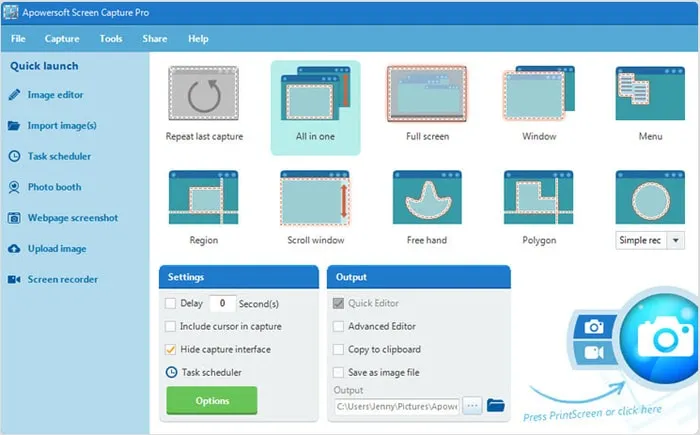
Apowersoft Screen Capture Pro is an innovative and highly-customizable screenshot-capture and image-editing tool. The program leaves no stone unturned when it comes to screenshot capturing, thanks to its ten screenshot modes, which includes Scrolling screenshots, Menu, and Freehand, just to mention a few.
Apowersoft

The scrolling Window capture mode allows you to capture an entire webpage, document, or browser, including contents hidden from the viewer. It also comes with a “Task Scheduler” that you can also use to take automatic screenshots.

In addition to screenshot capturing, Apowersoft Screen Capture Pro comes with a robust image editor which provides a wealth of options for you to edit your screenshots. What’s more, you can also use this tool to record the screen, upload, and share online. However, the program is quite expensive. A lifetime license goes for $79.95. You can also opt for monthly subscriptions starting from $12.95 per month.

5.GoFullPage - Full Page Screen Capture

Capture a screenshot of your current page in entirety and reliably—without requesting any extra permissions! -GoFullPage

The simplest way to take a full page screenshot of your current browser window. Click on the extension icon (or press Alt+Shift+P), watch the extension capture each part of the page, and be transported to a new tab of your screenshot where you can download it as an image or PDF or even just drag it to your desktop.

*No bloat, no ads, no unnecessary permissions, just a simple way to turn a full web page into an image.*

The advanced screen capture technology handles complex pages—including inner scrollable elements as well as embedded iframes—unlike any other extension. If you encounter an issue, please report it via the customer support flag icon on the capture page, so we can improve the extension for you and everyone else who uses it.

Knowing how to capture scrolling screenshots can be of great use to you, especially if you’re looking into creating some instructional content. Scrolling screenshots can also come in handy when you want to report software issues, as you’ll be able to point out the issues clearly.


8 Powerful Conference Call Platforms Worth Considering

Conference calling technology has developed dramatically since the days of sitting around a long board meeting table, hoping that the suit on the other end did not hear your little outburst, commenting in a manner that should be saved for happy hour or for your last day.  Technology has people connecting in new, vibrant ways across all  of platforms: social media, email, mobile apps, group video, global teaming and other such innovative ways.  Sort of makes you think for a second, why bother having an office building?

“Hello? Hello!  Can you hear me?  It’s me, your teammate! Can you repeat that?”

Skype’s first appearance in 2003 rang in a new era of doers.  Currently, there are hundreds of ways for teams to communicate, now it is a matter of finding the perfect balance.  Technology is constantly upgraded, allowing us to get fancy; employing new web-based technologies as well as appealing aesthetics, and there is now a modern spin on conference calling services. Here are eight powerful alternatives worth checking out.

How to Recover Deleted WhatsApp Images/Pictures from Android and iOS Devices

Today i got a call from one of the important person of my life Preetveer Singh (a best friend cum brother) being facing a problem of whatsapp recovery as we all know WhatApp is an integral part of our everyday communication, and any lose of data is highly frustrating. Losing your WhatsApp images is like a nightmare. But surprisingly it happens more often than you know, and recovering these deleted WhatsApp photos is not easy unless you have a robust solution like a WhatsApp recovery software.
If you are struggling with data lost, then this article will definitely be a lifesaver. Go through this comprehensive guide to know how to recover deleted WhatsApp photos and other data for iOS and Android devices like a pro.
recover whatsapp images
I have came up with a few solutions for you-


Part 1: How to Recover Deleted WhatsApp images Selectively on iOS Devices
Part 2: How to Recover Deleted WhatsApp images Selectively on Android Devices
Part 3: How to Recover WhatsApp images from Auto-Backup

10 Data Recovery Tools You Can Download For Free [Windows]

It happens to the best of us. We are working on that very important file when suddenly disaster strikes. It accidently gets deleted, corrupted, the computer died or a number of unfortunate things that prevent you from gaining access to the file. What’s worse, you don’t have a backup and are in desperate need of those important files urgently.

Well, don’t fret as it is possible to recover those deleted files. When you delete a file, you don’t actually ‘delete’ it. The system marks the area the file resides as reusable, removing the file from its index. This means that there is a period where it is possible to restore the file. To help you with your deleted data dilemma, we have for you 10 free data recovery tools for Windows, which will help from simple file recovery to a total partition rescue.
1. PhotoRec

PhotoRec is a powerful command line recovery tool that can recover your lost data by bypassing the file system, perfect for when your computer can see the drive but cannot access it or for use on a formatted drive. The app will work on different drive formats other than the ones used by Windows, including those used on OS X, and is also available on multiple platforms.
[Download here]

2. Recuva
Recuva provides a number of tools and features that makes recovering your data easier. The app will deep scan your drives and with it, you can recover deleted data on your drive or from drives that are damaged or formatted. It has the ability to recover data that was accidently deleted from certain apps such as your email program or the temp folder of Microsoft Word, useful when the power cuts off and you haven’t saved your progress. If the options seem too overwhelming, there is a wizard to guide you through the process.
[Download here]

10 Data Recovery Tools You Can Download For Free [Windows]

It happens to the best of us. We are working on that very important file when suddenly disaster strikes. It accidently gets deleted, corrupted, the computer died or a number of unfortunate things that prevent you from gaining access to the file. What’s worse, you don’t have a backup and are in desperate need of those important files urgently.

Well, don’t fret as it is possible to recover those deleted files. When you delete a file, you don’t actually ‘delete’ it. The system marks the area the file resides as reusable, removing the file from its index. This means that there is a period where it is possible to restore the file. To help you with your deleted data dilemma, we have for you 10 free data recovery tools for Windows, which will help from simple file recovery to a total partition rescue.
1. PhotoRec

PhotoRec is a powerful command line recovery tool that can recover your lost data by bypassing the file system, perfect for when your computer can see the drive but cannot access it or for use on a formatted drive. The app will work on different drive formats other than the ones used by Windows, including those used on OS X, and is also available on multiple platforms.
[Download here]

2. Recuva
Recuva provides a number of tools and features that makes recovering your data easier. The app will deep scan your drives and with it, you can recover deleted data on your drive or from drives that are damaged or formatted. It has the ability to recover data that was accidently deleted from certain apps such as your email program or the temp folder of Microsoft Word, useful when the power cuts off and you haven’t saved your progress. If the options seem too overwhelming, there is a wizard to guide you through the process.
[Download here]

4-D Printing: The Invention that Built Itself?


The latest advance in 3-D printing technology might make it possible for underwater structures to build themselves. So-called “4-D printing” is being used by researchers to create materials that transform into geometrical structures all on their own.
Skylar Tibbits, a trained architect and computer scientist at M.I.T., recently announced to the audience at this year’s TED Conference that he’s working with 3-D printing company Stratasys to create this entirely new kind of building material, which, when exposed to an energy source, canfold itself into pre-programmed shapes.
The New York Times technology blog, Bits, reports that the self-folding structures are made of two core materials, a synthetic polymer that doubles in volume when submerged in water, and another polymer that remains rigid in water. When the two polymers are combined and submerged, the expansion of the first polymer drives the joints of the structure to move, creating a preprogramed shape, like this simple cube.
Tibbits and his team at the M.I.T. self-assembly lab believe that this technology will eventually be used to create much larger, more complicated structures. And since the materials being researched can also be activated by light, heat, and sound, companies who adopt this new technology will be able to use a variety of energy sources to create these self-building structures.
Be Sociable,Share!

Awesome Facebook chat codes


Within few years Facebook evolves a lot and becomes the hobby of people around the globe. You meet new people, share your related ideas, see your favorite product pages and play social games on Facebook. You can also chat with your friends on Facebook, to enhance Facebook chat experience; Facebook introduces chat codes due to which you can include pictures according to your mod in your chat box during chat with someone, that’s really cool. Isn’t it? So here we have Awesome Facebook chat codes which enables you to include different kind of pictures in your Facebook chatting, enjoy your chat!!!

5 best free sites to find any software’s serial key


Softwares form core part of our computer systems. Most of the useful softwares require serial key for their smooth functioning and it is always a tough job to findsoftware serial key for free. Cracks are available on web which help in bypassing thislicense key prompt. But, many a times, such cracks are infected with viruses. So, it is always a better idea to find serial keys. So, I have provided a list of 5 best sites which you can use to find any software’s serial key.
Find software serial key:
Check the list below for the best sites to find any software’s serial key. To find your favorite software’s serial key, simply enter the software name in search box at these sites and you will get lots of serial keys compatible with your software.


25 websites to watch/download Bollywood movies online free


Bollywood is the biggest entertainment industry in India. Every year many movies are created and released in India thanks to Bollywood. If you are in mood to watch any movie, you can visit your nearby theatre or the best way is to watch Bollywood movie onlinefor free. There are many such websites on  web offering service to watch/download Bollywood movies online for free. Inorder to help you to select from such websites, I have prepared a list of 25 such best sites which you can trust to watch Bollywood movies online.
Watch Bollywood movies online free:
Many of these sites not only allow you to watch Bollywood movies online for free, but also you can download movies from their servers. Check out the list below:


[Update] IDM 6.11 with serial key free download full crack patch and keygen Latest version 2012

Internet Download Manager is a download accelator. By using this software we are able download from the Internet at a high speed.But when we are downloading the software from its official site it is not a full version. That is a 30 day trial pack. After these days are past it will ask you to enter serial key or to buy. So here is the process to make any latest downloaded IDM full version.After making this it will be registered for lifetime and not ask to register it further.

Here I will describe how can we make an latest IDM full version using some serial keys and adding some tricks.

Download Link: http://www.internetdownloadmanager.com/download.html

Otherwise download any version of idm and make it full version from the below process by using the serial keys and some simple changes in the hosts file.

Process:

1. Download the latest version IDM from here and install it.

2. Navigate to "C:\Windows\System32\drivers\etc" on your computer.

3. In the "etc" folder you will find a file with name "hosts"

4. Now right click on the Hosts file and choose "properties" and Navigate to "security" tab on the property window.

5. Now click on "Advanced" and Navigate to "owner" tab on the Advanced Security Option.

6. Click on "edit".

7. A new window will be opened. There you will find a table asking for "change Owner to". Now change there to your local user on which you logged on.(e.g. USER-PC or anything on your system. Not the Administrator user)

8. Below that you will find an check box "replace owner on sub containers and objects".

9. Just tick the check box.

10. Now apply all the modified setting. During apply the changes it will show an message "You dont have the permission to read the file or the contents of the directory. Do you want to change the permission of the file or folder to full control. All permission will be replaced if you press ok". Just Ignore the message and press OK.

11. Now again Right click of mouse onthe "Hosts" file and choose "properties" then Navigate to "security" tab.

12. Now click On "Edit" on the "Group or User Names" section.

13. A new window for permission will be opened.In the permission window choose the logged or local user and in the "Permission For User" tab tick on "Full Control".

14. Now apply those changes. And click on "ok"

15. Now open the "Hosts" file with notepad and Copy the below bold letters and paste it in the hosts file.


127.0.0.1 tonec.com

127.0.0.1 www.tonec.com

127.0.0.1 registeridm.com

127.0.0.1 www.registeridm.com

127.0.0.1 secure.registeridm.com

127.0.0.1 internetdownloadmanager.com

127.0.0.1 www.internetdownloadmanager.com

127.0.0.1 secure.internetdownloadmanager.com

127.0.0.1 mirror.internetdownloadmanager.com

127.0.0.1 mirror2.internetdownloadmanager.com


16. Now save the hosts file.

If you are facing any difficulty in saving the hosts file then you see the how to take ownership of a file.

Because, without taking the ownership we will not be able to modify the hosts file.

17. Now open Your Installed IDM application. Click on "registration" on the menubar and choose "Registration".

18. When you click on registration, Now a new window Will be open ask your First Name, Last Name, Email Address and Serial Key.

19. Enter your First name, Last Name, Email address in the required field. In the serial key field enter any of the following given below


RLDGN-OV9WU-5W589-6VZH1

HUDWE-UO689-6D27B-YM28M

UK3DV-E0MNW-MLQYX-GENA1

398ND-QNAGY-CMMZU-ZPI39

GZLJY-X50S3-0S20D-NFRF9

W3J5U-8U66N-D0B9M-54SLM

EC0Q6-QN7UH-5S3JB-YZMEK

UVQW0-X54FE-QW35Q-SNZF5

FJJTJ-J0FLF-QCVBK-A287M

20. And click on ok to register. that is it. Now your latest IDM become full version with the registration.

Enjoy and cheers...................

Soon Domain names(Web Addresses) in Indian 22 Indian language


Imagine you are typing a URL like भारत.भारत or भारत.in or you have got a domain name which is in your language say HINDI or BANGLA or MARATHI etc.This sound very interesting to have domain name as the same as what we talk in our Typical regional language. As of now Internet Corporation for Assigned Names and Numbers which is  International non-profit body that oversees allocation of domain names globally. (ICANN) has allowed India to register website addresses in as many as seven regional languages (Hindi, Gujarati, Urdu, Punjabi, Bengali and Telugu).

Goodbye Delhi


Finally friends..I have packed my bags up, and i m almost set to leave the heart of India. My stay here was excellent,a great family,bindass people,loads of knowledge and the opportunity of meeting new people and making new contacts.I especially thanks to my mentors and great friends Rohit sir, Naseem  sir ,Naveen sir and Sunil sir and ofcourse Rahul sir who have taught me on how to be more professional and to channelize my energy for the right cause. 

I will miss all the friends I have made.
Love you Delhi
KD

 PS: Since I m leaving to a much more jargoned place, expect some delays in web postings and articles..will be 100% online after june.

Unlimited Rapidshare Downloads


Unlimited Rapidshare Downloads

Its very easy to fool Rapid Share server if your IP address is assigned by your ISP. Just follow these simple steps:

clean up IE or netscape cookie( In this case the one that belong to rapidshare website)
On Command prompt
type -----> ipconfig /flushdns <---Enter
type -----> ipconfig /release <---Enter
type -----> ipconfig /renew <---Enter
type -----> exit <--------Enter

Or save these commands in a bat file and run it everytime you need to fool Rapidshare server.Remember to clean up rapidshare cookie in your temp Internet files folder.

Now you should be ready to download as many files as you want from their server.

And there is this cool link: paste it in the browser and see
CODE
http://www.google.com/search?lr=&as_qdr=all&q=+.rar+OR+.zip+OR+.pdf+OR+.exe+site%3Arapidshare.de

: Like this article ? You can always support me by buying me a beer or You can always try some of thecool merchandize from THEPROTECH.

winAUTOPWN v2.7 Released - Vulnerability Testing on Windows


What is winAUTOPWN?

winAUTOPWN is a minimal Interactive Exploit Framework which acts as a frontend for quick systems vulnerability exploitation. It is a collection of remote exploits using which one can compromise vulnerable systems. winAUTOPWN takes inputs like IP address, Hostname, CMS Path, etc. and does a smart multi-threaded portscan for TCP ports 1 to 65535. Open ports are then recognized and exploits applicable to those ports are executed with the aim of gaining a remote shell or the ability to run remote commands in certain cases.
Concisely, WINDOWS AUTOPWN or winAUTOPWN is an auto (hacking) shell gaining tool.
Besides the above, winAUTOPWN can also be used as an efficiency testing tool for Intrusion Detection Systems (IDS) and Web Application Filters (WAF). winAUTOPWN has a vast repository of exploits for various Operating systems like Microsoft Windows, Apple MAC OSX, Linux (various), BSD systems as well as for well-known services and daemon software. winAUTOPWN also contains a massive database of Shell Upload Vulnerability, Remote File Inclusion and Remote Command Execution exploits. These can be fired one after the other instantly and this can aide is checking if the WAF is preventing / alerting accordingly against such threats or no. Similarly shell aiming exploits too can be fired up in a row to test the strength and effectiveness of IDS and IPS
winAUTOPWN also has a BSD based cousin called bsdAUTOPWN. bsdAUTOPWN is a just like winAUTOPWN but is not an exact recompilation of winAUTOPWN. It has been written from scratch for and on FreeBSD OS to match the power and functionality offered by the Operating System. Like winAUTOPWN, even bsdAUTOPWN has a multi-threaded portscan feature and it too detects open ports and attempts to exploit them accordingly using the available exploits in the arsenal. We’ll come to a detailed discussion about bsdAUTOPWN later.

Why winAUTOPWN?

winAUTOPWN is the only framework available on the Internet to date which maintains the exploit style and the exploit writer’s credits and, many times, the exploits completely intact. Besides that, the exploit is used just the way it is without changing any major functionality. Shellcodes or the impact making part of the exploit is many times changed from default “calculator launching code” to a remote TCP port binding shellcode. Also hardcoded hindrances like IP addresses, ports; URLs, etc. are removed to suit automation.
winAUTOPWN is a quick and small interface which is regularly updated with recent exploits available both in the wild as well as those released by the vendors themselves. winAUTOPWN is the only available exploit Framework which will ask you nothing but the least details about your target. You do not have to worry about which exploit to try onto which open port. Let winAUTOPWN handle it for you.
Although this may sound like child’s play – with a script kiddie attitude, winAUTOPWN can be used in a both blind attacking as well as in a smart strategized approach. It has features to test only a few customized (user-written/selected) exploits and/or even a few selective pre-loaded exploits according to the open ports the attacker wishes too use. This makes it more than just a script-kiddie tool wherein if you have already understood your target setup, you have the liberty to test your expertise by firing only the closest exploits which are promising, which may get you quickly in, thus making you faster than most blind script kiddies.

Crack wifi passwords in less than 4 minutes

FUN FACTS:

-WEP stands for Wired Equivalent Privacy


-WEP is used to secure wireless networks from eavesdroppers


-WEP usually takes hours to crack


WEP has always been a long and tedious job, untill recently, when two FBI agents demonstrated how it´s possible to crack WEP in under 4 minutes (3 to be exact).

Download from a paypal site without paying a penny!

Just a little basic html tip for those who are trying to download an application from sites which has an paypal order page & link to start you off.

Use a proxy when you try this to hide your ip as some sites will record your ip when you connect for security.

1) Rightclick your mouse (ctrl+click) viewsource and open the source of the site in an a texteditor
2) Search for the word "return"
3) Next to it you can find the url for the thank you page
4) Copy the url and paste it in your browser and you will see the download link

This works only if you can download instantly after payment, it will not work if the link needs to be emailed to you.

How 2 Find EVERYTHING uploaded on Rapidshare

How 2 Find EVERYTHING uploaded on Rapidshare

All rapidshare.de Downloads:
/http://www.google.com/search?hl=en&lr=&as_qdr=all&q=+.*+site%3Arapidshare.de

Apps Rapidshare.de Downloads:
/http://www.google.com/search?hl=en&lr=&as_qdr=all&q=.cab+OR+.exe+OR+.rar+OR+.zip+site%3Arapidshare.de&btnG=Search

Movies rapidshare.de Downloads:
/http://www.google.com/search?hl=en&lr=&as_qdr=all&q=+.Avi+OR+.mpg+OR+.mpeg+site%3Arapidshare.de&btnG=Search

: Like this article ? You can always support me by buying me a cup of coffee or You can always try some of thecool merchandize from THEPROTECH.

250+ Tech books online

1
10 minute guide to lotus notes mail 4.5
http://www.parsian.net/set1252/pages/books.htm

2
10 minute guide to Microsoft exchange 5.0
http://www.parsian.net/set1252/pages/books.htm

3
10 minute guide to outlook 97
http://www.parsian.net/set1252/pages/books.htm

4
10 minute guide to schedule+ for windows 95
http://www.parsian.net/set1252/pages/books.htm

36 Graphics & Design Ebooks

Maya, Photoshop, Macromedia, Bryce, Digital Photography, & more....

Download with FlashGet

f*p://195.135.232.80/Books/design/8.books.Maya.[by.KiN_www.netz.ru].rar
f*p://195.135.232.80/Books/design/A.Short.Course.in.Digital.Photography.[by.KiN_www.netz.ru].rar
f*p://195.135.232.80/Books/design/Adobe.Creative.Suite.Keyboard.Shortcuts.[by.KiN_www.netz.ru]_3,1.MB.rar
f*p://195.135.232.80/Books/design/Adobe.Photoshop.CS.in.10.Simple.Steps.or.Less.(2004).[by.KiN_www.netz.ru]_7,84 MB.rar
f*p://195.135.232.80/Books/design/Adobe.Photoshop.Tutorial.7.Day.Course.html.a.[28.84.MB_www.netz.ru].rar

Top 10 Tricks to exploit SQL Server Systems

Whether it is through manual poking and prodding or the use of security testing tools, malicious attackers employ a variety of tricks to break into SQL Server systems, both inside and outside your firewall. It stands to reason then, if the hackers are doing it, you need to carry the same attacks to test the security strength of your systems. Here are 10 hacker tricks to gain access and violate systems running SQL Server.
1. Direct connections via the Internet

These connections can be used to attach to SQL Servers sitting naked without firewall protection for the entire world to see (and access). DShield's Port Report shows just how many systems are sitting out there waiting to be attacked. I don't understand the logic behind making a critical server like this directly accessible from the Internet, but I still find this flaw in my assessments, and we all remember the effect the SQL Slammer worm had on so many vulnerable SQL Server systems. Nevertheless, these direct attacks can lead to denial of service, buffer overflows and more.

 
Design by gitstein | Bloggerized by Kuldeep