Showing posts with label Cellphones and mobile. Show all posts

7 Ways to Connect Android Phone to TV


Hey guys, Today in this post I’ll tell you, 7 Ways to Connect Android Phone to TV. Sometime this thought comes in your mind that if you can connect your android phone with your TV and can play music, songs, videos or games on it but many people are not knowing that it can be done so easily. Display of our android phone is much smaller. So that, we aren’t able to enjoy games and videos on it but if we can watch it on the screen of our TV then it will be much more enjoyable than that of watching it on mobile screen. If smart or non smart TV is there at your home then you can connect your android phone with your TV and watch your mobile screen on TV. Connecting android phone to TV is very simple only you should know how to connect it.  
Connect Android Phone To TV
Now the most important thing is that if you have TV in your house then what kind of is smart or non-smart? Because if you have smart TV then you can connect your android phone to TV with wifi without any wire. But if you have a non-smart TV then you have to use the wire to connect them. Means smart TV and non-smart TV have different ways of connecting with android phone. In today’s post, we are going to tell you about the two types of method, which can help you connect with your android phone to TV. After reading this post, you can connect any kind of TV to your android phone. There are many types of way to connecting them.

How to Recover Deleted WhatsApp Images/Pictures from Android and iOS Devices

Today i got a call from one of the important person of my life Preetveer Singh (a best friend cum brother) being facing a problem of whatsapp recovery as we all know WhatApp is an integral part of our everyday communication, and any lose of data is highly frustrating. Losing your WhatsApp images is like a nightmare. But surprisingly it happens more often than you know, and recovering these deleted WhatsApp photos is not easy unless you have a robust solution like a WhatsApp recovery software.
If you are struggling with data lost, then this article will definitely be a lifesaver. Go through this comprehensive guide to know how to recover deleted WhatsApp photos and other data for iOS and Android devices like a pro.
recover whatsapp images
I have came up with a few solutions for you-


Part 1: How to Recover Deleted WhatsApp images Selectively on iOS Devices
Part 2: How to Recover Deleted WhatsApp images Selectively on Android Devices
Part 3: How to Recover WhatsApp images from Auto-Backup

Amazon Prime Video – Subscribe for Free trial And Get Rs. 200 Amazon Pay Balance

Amazon Prime Video :-Amazon Recently launched Amazon Prime video  in india . Amazon prime Video is A website which Provide you all Latest, Famous ,exclusive TV shows as well as award-winning Amazon Originals.You Can also watch popular US Tv Episodes Series online By subscribing amazon prime video .You can feel True HD For Latest movies
In addition to unlimited streaming, your Prime membership includes FREE One-Day and Two-Day delivery on eligible items on Amazon.in, early access to deals and more – at an introductory price of Rs 499/year.

Yahoo Disables Email Auto-Forwarding; Making It Harder for Users to Move On

Yahoo! has disabled automatic email forwarding -- a feature that lets its users forward a copy of incoming emails from one account to another.
The company has faced lots of bad news regarding its email service in past few weeks. Last month, the company admitted a massive 2014 data breach that exposed account details of over 500 Million Yahoo users.
If this wasn't enough for users to quit the service, another shocking revelation came last week that the company scanned the emails of hundreds of millions of its users at the request of a U.S. intelligence service last year.
That's enough for making a loyal Yahoo Mail user to switch for other rival alternatives, like Google Gmail, or Microsoft's Outlook.

3D-Printed Machine Hacks Master Lock in 30 Seconds

Last month, semi-famous gray-hat hacker Samy Kamkar showed us how to open any wheel-combination-based Master Lock. Now he's showing you how to build a machine that can do it for you.
In case you missed it, Kamkar's method of cracking a MasterLock took some practice. But his new Combo Breaker device gets it right every time, proving that Kamkar has a killer instinct for breaking through security.

Use WhatsApp? Get ready for more spam

Facebook-owned WhatsApp, the popular mobile messaging service, is considering opening its platform for businesses to communicate with their customers. This could be a potential way to monetize the service but will also allow brands and marketers to contact users leaving them vulnerable to spam.

The development was first reported by Bloomberg, which cited Facebook chief financial officer David Wehner, who spoke about the plans at a tech conference in Boston.

"We think that enabling that B2C [business-to-consumer] messaging has good business potential for us. As we learn those things, I think there's going to be opportunities to bring some of those things to WhatsApp, but that's more longer term."


TRAI recommends one bill for all services virtual network operator

The Telecom Regulatory Authority of India (TRAI) recommended to the government creation of a virtual network operator (VNO), a new telecom service provider that would work like a reseller for telecom operators and bill directly to customers.

According to the recommendation, a VNO would offer all telecom services permitted under new licences.

“Since VNOs are a new concept in India, initially, the duration of the licence of a VNO should be fixed at 10 years, extendable further for 10 years at a time by the licensor,” TRAI said.

Disabling 'Find My iPhone' on iOS 7 without any Password


iOS devices have a feature called 'Find My iPhone', allows device owner to locate their stolen devices using linked Apple ID with iCloud Account.
Unfortunately, a security flaw in iOS make it possible to turn off Find My iPhone without a password and enabled thieves to bypass the protection which makes the iPhone untraceable if lost or stolen.
To Set-Up 'Find My iPhone' feature, users need to link their Apple ID with it and this will not only helps in locating the device but also gives permission to its user to remove all the data, drive direction to the lost device, lock the device by a passcode and displays a custom message on the locked screen.
KILL 'Find My iPhone' WITHOUT APPLE PASSWORD
Normally, disabling Find My iPhone requires Apple ID password, but according to the vulnerability reported by Miguel Alvarado, a thief can bypass all of this security feature without knowing your Apple account's password.
In a video demonstration on iOS 7, he explained that just by tapping the “Delete Account” in the iCloud settings panel and switch the “Find My iPhone” to off mode simultaneously, one can easily remove the iCloud account without any password authentication.


But doing so is not that much easy as it actually looks, a novice has to perform this a number of times to get this done.
After Doing so, just connect the hacked iPhone with your computer and use iTunes software to restore the smartphone's Data.
Similar flaw was disclosed in February this year allows anyone to disable 'Find My iPhone' on iOS 7.0.4 devices.
HOW TO PROTECT YOUR iPHONE
The the vulnerability is totally irrelevant if you have a passcode on your iPhone. Apple will release a fix as soon as possible, until then users are advised to keep a secure passcode with a very short timer, that prevents anyone from getting into the iCloud settings at all.

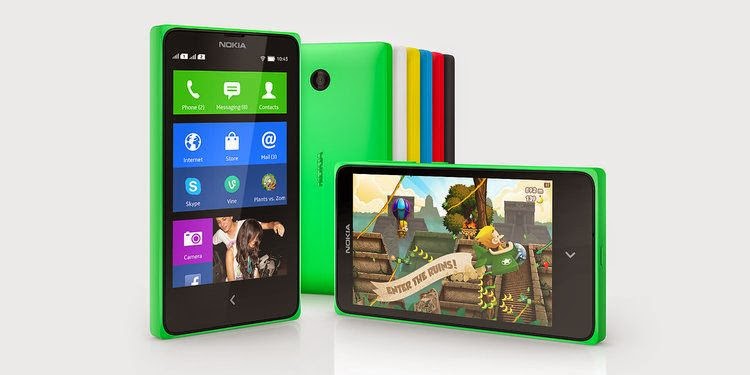
Nokia X, X+ and XL Dual Sim Android Phone launched: Pros and Cons

 Nokia X

Nokia X, one of the most waited stuff from Nokia finally announced. Till now Nokia was only manufacturing the Windows based smartphone. Even Nokia has been acquired by Microsoft recently, the origin of Windows platform but surprisingly Nokia has announced its very first Android based smart phone.

A few days ago the Normandy was in trend as the upcoming phone from Nokia with Android OS. But it turn out with something different. The phone has been announced in MWC 2014, Barcelona. The phone is launched with three different models, Nokia X, Nokia X+ and Nokia XL.

Nokia X Features -

Android Operating System -

Its celebration time. Android is finally available on Nokia hardware. Explore all the features of Android on Nokia X. Download thousands of apps from Google play and enjoy them on your Nokia X. The Nokia X is currently loaded with Jelly Bean v4.1.2.

Processor -

As per the processor it is coming with Dual Core 1Ghz Cortex A-5 CPU, Adreno 203 GPU and  Qualcomm Snapdragon chipset for better and faster performance on Android platform.

Camera -

Camera, the most important thing for at-least half of the people who buy smart phone. Well you might get little disappointed here because Nokia X is loaded with 3.5 MP primary camera with no secondary camera. The phone records the video @48o p @30fps.

Design and Display -

Nokia X is actually a 4 inch smart phone. But as per its cost and considering the brand name, its good. It has IPS LCD capacitive touchscreen with 16 M colors. It also supports multi touch up-to two fingers.

Nokia X Key Specifications -

Android OS v4.1.2 Jelly Bean(Update Expected)
3.5 MP primary camera
4 GB internal memory, 512 MB RAM
1 GHz Dual core processor
4 inch touch screen
Pros -

Affordable Phone, low cost.
Nokia hardware on Android platform (For the First time)
1 GHz processor
Cons -

No secondary camera
Nokia X Price -

Price in India – Rs. 8,599 (approx)

Stratasys launches multi-material colour 3D printer

                      The new $330,000 printer is targeted at industrial designers and manufacturers
The world's first multi-material full-colour 3D printer has been launched by Stratasys, the owner of the MakerBot range of printers.

It features "triple-jetting" technology that combines droplets of three base materials, reducing the need for separate print runs and painting.

The company said the Objet500 Connex3 Color Mutli-material 3D Printer would be a "significant time-saver" for designers and manufacturers.

iPhone 5S fingerprint sensor hacked by Germany's Chaos Computer Club

Biometrics are not safe, says famous hacker team who provide video showing how they could use a fake fingerprint to bypass phone's security lockscreen

An Apple employee instructs the use of the fingerprint scanner technology built into the company's iPhone 5S. German hackers say they can beat it. Photograph: Ng Han Guan/AP

Germany's Chaos Computer Club says it has cracked the protection around Apple's fingerprint sensor on its new iPhone 5S, just two days after the device went on sale worldwide.
In a post on their site, the group says that their biometric hacking team took a fingerprint of the user, photographed from a glass surface, and then created a "fake fingerprint" which could be put onto a thin film and used with a real finger to unlock the phone.

Download WhatsApp for PC [Guide to use WhatsApp on Computer - 7/8/Vista/XP]

WhatsApp for PC! Many of you might be wondering but now you can actually make use of WhatsApp on Windows platforms and in the due course of this article, we would be providing a complete Guide to use WhatsApp on PC.

You are interested in this title pretty much implies that you are addicted to or are keen to use WhatsApp for PC  since you are probably not comfortable using WhatsApp in your 4 or 5 inch touch screen smartphone. Well, if that is the case, join the club. I too find it so pestering to get my fingers around those little buttons. Darn it!

Good for people like us; we’ve got an alternative to using WhatsApp on PC other than on an Android, Symbain, Blackberry or on an iOS. One can effectively use WhatsApp on PC, just like on any one of the above mentioned handheld devices. Indeed, with much more comfort! Technology has an answer for every problem. Just that, tech offers two answers for this one.
Fine; I’ll not keep you waiting anymore. Let’s jump right into the business of how to download WhatsApp for PC and use it that way. Make sure you follow the instructions carefully for downloading WhatsApp for PC.

Guide to use WhatsApp on PC:

In this how to use WhatsApp for PC tutorial, I’d be helping you download WhatsApp for PC in two distinct methods with screenshots. Both the methods help to install WhatsApp on PC with equal ease. So you can go for either. Both work well in my case.
  1. Download and Install WhatsApp for PC using BlueStacks.
  2. Download and Install WhatsApp for PC using Wassapp.

Method 1:Download WhatsApp for PC Using Bluestacks

BlueStack is an Android emulator that lets us install and use almost all Android apps and games on a PC.  This is how we’ll avail WhatsApp for PC using this android emulator. It is not just on PC that you can take advantage of BlueStack, but also on a MAC. When it comes to PC, BlueStack works on all widely deployed operating systems i.e., Windows XP, Windows Vista,Windows 7, and Windows 8.
Step 1: Get BlueStack from here and install it on your PC.

Step 2: Upon installation, open BlueStack. You’d find a welcome screen showing the top 25 Apps.
Step 3: Navigate to the My Apps tab next to top 25 Apps. You will find the apps that are downloaded by default here.
Step 4: In the same screen select App Search, wherein you’d be searching for the WhatsApp app.
Step 5: In the search bar that appears, type WhatsApp or WhatsApp for PC. The search engine searches for the keyword in Google Play, one mobile and the Amazon App Store, and shows a search result from all three stores.
Step 6: Select WhatsApp Messenger from the 1 mobile store. You then need to click install button against WhatsApp Messenger in the screen that follows.


Once done, BlueStack downloads WhatsApp for you. It takes about 2 minutes for this to happen.
Step 7: You will now find WhatsApp installed in you ‘My Apps’ tab. You are just one step behind; i.e., configuring your WhatsApp account.
Step 8: Open WhatsApp and click I agree with terms button.
Step 9: You then have to select your nation and put in your mobile number and say Ok.
Step 10: WhatsApp will now send you a SMS or Voice verification. You just got to enter the code you get via the SMS of voice call from WhatsApp.

Voila! You are now done with a fresh WhatsApp installation on your PC.  You’ve learnt to use WhatsApp for PC using Bluestacks App Player.

4 Best Apps For Blackberry: Feel Proud To Have BB Protection!


Internet is full of reviews about the Apps available for Ios and Android. Windows 8 is also in the competition. However, Blackberry is also enjoying the attention of its hard-core fans. This piece of writing will reveal the apps not for yours or Android, but for the Blackberry operating system.

Android Beats iPhone in Customer Satisfaction


The iPhone 5 is still quite popular worldwide, but when it comes to user satisfaction, it's not quite the king of the hill.

On Device Research has released a recent study on the popularity of smartphones in both the United States and the United Kingdom, polling 92,825 U.S. and 52,140 U.K. mobile users.

The Motorola Atrix HD leads the charge in smartphone satisfaction in the United States, earning 8.57 (on a scale of 10). Three other Android devices follow it: the Motorola Droid Razr M (8.5), the HTC Rezound 4G (8.32) and the Samsung Galaxy Note 2 (8.26). Apple's iPhone 5 sits at fifth place, with a ranking of 8.23. That's hardly a bad number, and all the scores are quite close, but the results show how far Android devices have come in popularity.

Another Hack Allows Access to Locked iPhones


A glitch in Apple's iOS 6.1 operating system makes it possible to access an iPhone's sensitive data, including contacts and photos, without entering the correct passcode, or personal identification number (PIN).
The security flaw, the second PIN bypass that security researchers have found this month, takes a bit of tricky button-pushing in a specific order. But once done successfully, it allows an intruder to download the phone's data over USB to a computer that would have otherwise been locked out.

Hindi typing coming soon to the BlackBerry 10 multi-lingual keyboard


While the BlackBerry10 launch with the release of the new Z10 smartphone revealed the fact that content consumption (essentially, reading) would be supported in eight Indian languages—Telugu, Tamil, Kannada, Malayalam, Devanagari (Hindi), Gurmukhi (Punjabi), Gujarati and Bengali, what was missed was the fact that no Indian language featured in the list of languages supported by the virtual keyboard on the BlackBerry Z10, one that many reviewers have termed the best keyboard on any touch-screen smartphone.But in an exclusive, Vivek Bhardwaj, Global Head of the Software Portfolio for BlackBerry and the key executive responsible for BlackBerry10 has revealed that typing in Hindi will be supported on the Blackberry 10 virtual keyboard later this

Creating undetectable computer virus surprisingly simple

Since the Flame computer virus was discovered earlier this week, much attention has been focused on the cleverness of this piece of malicious code.

Some online security experts say the fact that Flame — alternatively known as Flamer or sKyWIper — went unnoticed for two years highlights another problem: the poor state of virus detection.

“Why does detection suck so much in the year 2012?” asks Brian Bourne, a Toronto-based cyber-security expert and founder of the SecTor cyber-security conference.

41MP Nokia 808 smartphone launches in India


NEW DELHI: Nokia's 41MP camera phone is finally in India. The 41 megapixel smartphone is available on the Nokia Shop at Indiatimes.com at price of Rs 29,999.


Nokia PureView 808 has generated lot of interest due to the PureView imaging technology and the gigantic 41-megapixel camera sensor on-board. Other features of the smartphone include Carl Zeiss optics with 4X lossless zoom and Nokia Rich Recording.


The smartphone sports a 4-inch 360 x 640 pixel resolution display and is powered by a 1.3 GHz ARM 11 processor. Running on Nokia's Symbian Belle OS, the smartphone comes with a 16GB of internal memory.


Nokia 808 PureView is presently available in black colour.


TRICK TO READ PUNJABI FONT POSTS IN MOBILES


TRICK TO READ PUNJABI FONT POSTS IN MOBILES

HERE IS THE TRICK TO READ POSTS WRITTEN IN PUNJABI FONTS USING MOBILES. USUALLY THE PUNJABI FONT
APPEARS AS BOXES IN MOBILES AND IS NOT READABLE. SO TO READ SUCH POSTS USE THIS TRICK.
please follow the instructions carefully and don't change any other setting except the one discribed below.IT MAY CRASH THE SOFTWARE.
if some setting is changed accidently then just uninstall the software and reinstall it again.

here are the steps

1. DOWNLOAD 'OPERA MINI' SOFTWARE AND INSTALL IN MOBILE
(TO INSTALL OPEN m.opera.com in mobile browser and download opera mini  from website)


2. open opera mini and write following command in address bar. before writing erase 'www' which is present by default


opera:config


Airtel launches 4G services at Rs 999/month


Bharti Airtel, has launched India’s first 4G services in Kolkata today. Airtel , which had bagged BWA spectrum in four telecom circles -- Kolkata, Maharastra, Punjab and Karnataka -- for Rs.3,314.36 crore in 2010, selected Chinese telecom equipment maker ZTE to manage its services in Kolkata. The services are priced between Rs 999 per month to Rs 1999 per month for with a free quota of 6- 9 GB.
 
Design by gitstein | Bloggerized by Kuldeep