Showing posts with label Privacy Attacks. Show all posts

Configure or Turn Off DEP (Data Execution Prevention) in Windows

It can cause issues with some older third-party software

Data Execution Prevention (DEP) is one of those ‘blursed’ things. It’s a blessing most of the time when it does its job and doesn’t interfere, but cursed when it does interfere. 

Let’s look at DEP and how to configure it, or turn DEP off, depending on your needs.

What Is DEP & What Does It Do?
According to Microsoft, DEP is :
“…a set of hardware and software technologies that perform additional checks on memory to help prevent malicious code from running on a system.”  

Dell simplifies it a bit and tells us that DEP

“…can help protect your computer by monitoring your programs to make sure that they use system memory safely.”


What does that mean? There are certain areas in the computer’s memory which aren’t intended to have code running in them, but sometimes code does run there. 

Usually, the code that will run there is malicious. DEP will monitor those areas and if it sees something going on in those areas it will shut it down. If you want to get in-depth about how it works, read Microsoft’s detailed description of Data Execution Prevention.

So Why Does DEP Cause Problems?
Even today, computers are dumb. They cannot reason, they can only use the most basic of logic. Plus, that logic is put into them by humans so computers also get our mistakes put into them. 

Sometimes, good programs will wander off into the areas that DEP monitors and work in those spaces.


When this happens, DEP will sometimes shut the entire program down and let you know via an error message. But sometimes DEP will just cause the program to run very poorly and there won’t be anything obvious to tell you why. 

What Programs Have Problems With DEP?
Programs that conflict with DEP are typically older programs or built on old codebases. A lot of Enterprise Resource Planning (ERP) software is built on codebases that go back to the 1970s. There was no DEP then, so the program will go into areas that DEP patrols.

64-bit programs were created after DEP was well established, so they were developed to comply. Most programs that conflict with DEP will be 32-bit programs. 

Non-Microsoft programs that interact with Windows Services heavily or run their own Windows Services may be tripped up by DEP. If that is the case, the vendor will recommend to completely turn off DEP.

For the home user, old games that are 32-bit, and some emulators for playing even older games, are the most likely to conflict with DEP.

Old device drivers or drivers downloaded from unofficial sources may also trigger DEP errors. Only download drivers from the hardware manufacturer or Microsoft, and update your drivers regularly.

How Do I Know If DEP Is The Problem?
You may have to go into Event Viewer and sift through the logs for Event ID 1000. If you find one, it may look like this:

Event ID : 1000 - DEP Error : Generic host for Win32 servicesGeneric Host Process for Win32 Services - DEP : Application Error
Event Type: Error
Event Source: Application Error
Event Category: (100)
Event ID: 1000
 You may see other errors referencing things like:

  • 0xFC:ATTEMPTED_EXECUTE_OF_NOEXECUTE_MEMORY – occurs when a device driver is trying to run in memory. It may be a bad or outdated driver. You’ll want to update your drivers. 
  • STATUS_ACCESS_VIOLATION (0xc0000005) – occurs when programs are trying to run in DEP protected memory space.
How To Configure Or Turn Off DEP
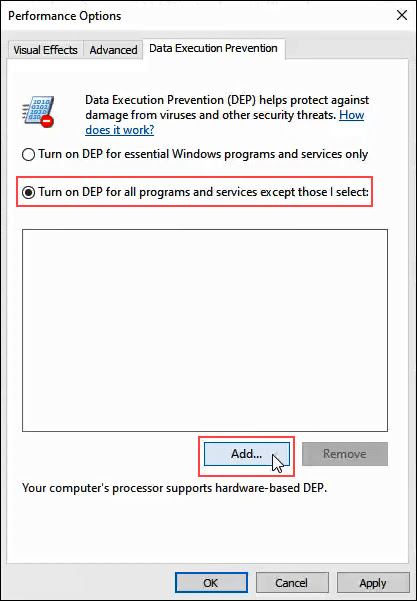
In Windows 10, DEP defaults to the setting Turn on DEP for essential Windows programs and services only. Most of the time, this is sufficient. It means that the majority of your programs will be ignored by DEP. 

But if DEP helps protect the computer and it doesn’t have a performance hit, you may want to select Turn on DEP for all programs except those that I select. Then if you find a program that has a problem with DEP, we can add it as an exception. Let’s look at how to do that.
  • Open the Control Panel then open System.

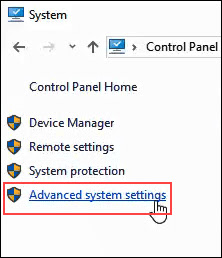
  • On the left side of the System window, click on Advanced System Settings.
  • The System Properties window should open and already be set to the Advanced tab. In the Performance area, click on Settings.
  • In the Performance Options window, click on the Data Execution Prevention tab.


  • With Turn on DEP for all programs except those that I select selected, click on the Add button near the bottom of the window.


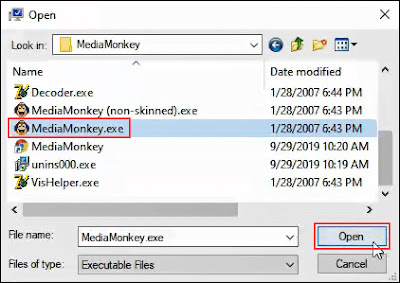
  • Navigate to the executable for the program that we’d like to add as an exception. It will most likely be in C:/Program Files (x86). 
  • In this example, we’re adding MediaMonkey, an old music player utility. Click on the .exe file once we find it and click on Open.


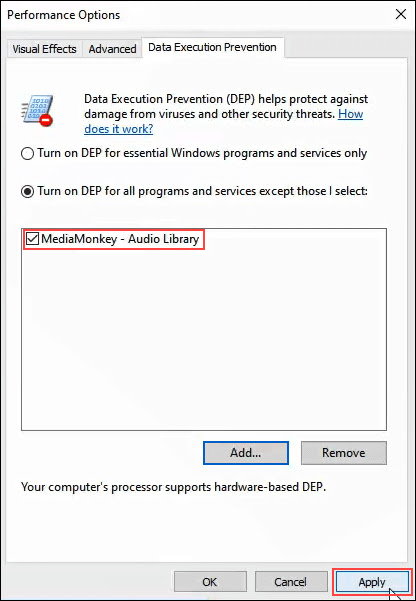
  • In Performance Options, click on Apply. Now, MediaMonkey will run outside of DEP protection while all others will run within DEP protection.
Turn DEP Completely Off

If you want to turn DEP completely off, we advise only doing that as part of troubleshooting an issue. DEP is there for your protection. 

Since it’s something that isn’t advised, there isn’t a good point-and-click way to do it. Let’s look at how we can turn off DEP.
  • Open the Command window as Administrator. Do this by typing cmd in the program search field near the Start menu.

  • Enter the command bcdedit.exe /set {current} nx AlwaysOff and press enter.


bcdedit.exe is a Windows utility for editing boot configuration data, hence     .

/set tells bcedit to set an option value entry in the boot configuration.

{current} tells becedit to work with the boot configuration being used right now.

nx is short for no execute and is the setting name for DEP in the boot configuration.

AlwaysOff is self-explanatory.
  • Restart the computer.
  • DEP will now be completely, and permanently off.

Turn DEP On For Everything
To turn DEP on for absolutely everything, the process and command is like above.

  • Open the Command window as Administrator, following the instructions in the procedure above.
  • Enter the command bcdedit.exe /set {current} nx AlwaysOn. 
        

  • Restart the computer.
  • DEP will be turned on and all programs monitored.
After turning DEP to being always on or always off, it CANNOT be changed via the Data Execution Prevention tab in system settings. 

Let’s look at how to change it so that the radio buttons in the DEP tab can be used again.

Set DEP Back To Default Behavior
To set DEP behavior back to default and make it manageable again via system settings, do the following.
  • Open the Command window as Administrator.
  • Enter the command bcdedit.exe /set {current} nx OptIn.

  • Restart the computer.
  • Now the radio buttons in the DEP tab in systems settings are accessible again.
To DEP Or Not To DEP
We recommend leaving DEP on its default setting of Turn on DEP for essential Windows programs and services only, unless it’s necessary to change it to troubleshoot problems that may be DEP-related.

Understanding the Impact of Apache Log4j Vulnerability

 More than 35,000 Java packages, amounting to over 8% of the Maven Central repository (the most significant Java package repository), have been impacted by the recently disclosed log4j vulnerabilities (1, 2), with widespread fallout across the software industry. The vulnerabilities allow an attacker to perform remote code execution by exploiting the insecure JNDI lookups feature exposed by the logging library log4j. This exploitable feature was enabled by default in many versions of the library.

This vulnerability has captivated the information security ecosystem since its disclosure on December 9th because of both its severity and widespread impact. As a popular logging tool, log4j is used by tens of thousands of software packages (known as artifacts in the Java ecosystem) and projects across the software industry. User’s lack of visibility into their dependencies and transitive dependencies has made patching difficult; it has also made it difficult to determine the full blast radius of this vulnerability. Using Open Source Insights, a project to help understand open source dependencies, we surveyed all versions of all artifacts in the Maven Central Repository to determine the scope of the issue in the open source ecosystem of JVM based languages, and to track the ongoing efforts to mitigate the affected packages.

How widespread is the log4j vulnerability?

As of December 16, 2021, we found that 35,863 of the available Java artifacts from Maven Central depend on the affected log4j code. This means that more than 8% of all packages on Maven Central have at least one version that is impacted by this vulnerability. (These numbers do not encompass all Java packages, such as directly distributed binaries, but Maven Central is a strong proxy for the state of the ecosystem.)

As far as ecosystem impact goes, 8% is enormous. The average ecosystem impact of advisories affecting Maven Central is 2%, with the median less than 0.1%.


Direct dependencies account for around 7,000 of the affected artifacts, meaning that any of its versions depend upon an affected version of log4j-core or log4j-api, as described in the CVEs. The majority of affected artifacts come from indirect dependencies (that is, the dependencies of one’s own dependencies), meaning log4j is not explicitly defined as a dependency of the artifact, but gets pulled in as a transitive dependency.


What is the current progress in fixing the open source JVM ecosystem?

We counted an artifact as fixed if the artifact had at least one version affected and has released a greater stable version (according to semantic versioning) that is unaffected. An artifact affected by log4j is considered fixed if it has updated to 2.16.0 or removed its dependency on log4j altogether.

At the time of writing, nearly five thousand of the affected artifacts have been fixed. This represents a rapid response and mammoth effort both by the log4j maintainers and the wider community of open source consumers.

That leaves over 30,000 artifacts affected, many of which are dependent on another artifact to patch (the transitive dependency) and are likely blocked.


Why is fixing the JVM ecosystem hard?

Most artifacts that depend on log4j do so indirectly. The deeper the vulnerability is in a dependency chain, the more steps are required for it to be fixed. The following diagram shows a histogram of how deeply an affected log4j package (core or api) first appears in consumers dependency graphs. For greater than 80% of the packages, the vulnerability is more than one level deep, with a majority affected five levels down (and some as many as nine levels down). These packages will require fixes throughout all parts of the tree, starting from the deepest dependencies first.


Another difficulty is caused by ecosystem-level choices in the dependency resolution algorithm and requirement specification conventions.
In the Java ecosystem, it’s common practice to specify “soft” version requirements — exact versions that are used by the resolution algorithm if no other version of the same package appears earlier in the dependency graph. Propagating a fix often requires explicit action by the maintainers to update the dependency requirements to a patched version.
This practice is in contrast to other ecosystems, such as npm, where it’s common for developers to specify open ranges for dependency requirements. Open ranges allow the resolution algorithm to select the most recently released version that satisfies dependency requirements, thereby pulling in new fixes. Consumers can get a patched version on the next build after the patch is available, which propagates up the dependencies quickly. (This approach is not without its drawbacks; pulling in new fixes can also pull in new problems.)

How long will it take for this vulnerability to be fixed across the entire ecosystem?
It’s hard to say. We looked at all publicly disclosed critical advisories affecting Maven packages to get a sense of how quickly other vulnerabilities have been fully addressed. Less than half (48%) of the artifacts affected by a vulnerability have been fixed, so we might be in for a long wait, likely years.
But things are looking promising on the log4j front. After less than a week, 4,620 affected artifacts (~13%) have been fixed. This, more than any other stat, speaks to the massive effort by open source maintainers, information security teams and consumers across the globe.

Where to focus next?
Thanks and congratulations are due to the open source maintainers and consumers who have already upgraded their versions of log4j. As part of our investigation, we pulled together a list of 500 affected packages with some of the highest transitive usage. If you are a maintainer or user helping with the patching effort, prioritizing these packages could maximize your impact and unblock more of the community.
We encourage the open source community to continue to strengthen security in these packages by enabling automated dependency updates and adding security mitigations. Improvements such as these could qualify for financial rewards from the Secure Open Source Rewards program.
You can explore your package dependencies and their vulnerabilities by using Open Source Insights.


Google's New Tool Alerts When You Use Compromised Credentials On Any Site


With so many data breaches happening almost every week, it has become difficult for users to know if their credentials are already in possession of hackers or being circulated freely across the Internet.
Thankfully, Google has a solution.

Beware! Don't Fall For "Font Wasn't Found" Google Chrome Malware Scam


Next time when you accidentally or curiously land up on a website with jumbled content prompting you to download a missing font to read the blog by updating the Chrome font pack…
…Just Don't Download and Install It. It's a Trap!

Scammers and hackers are targeting Google Chrome users with this new hacking scam that's incredibly easy to fall for, prompting users to download a fake Google Chrome font pack update just to trick them into installing malware on their systems.

9 Popular Password Manager Apps Found Leaking Your Secrets

Is anything safe? It's 2017, and the likely answer is NO.

Making sure your passwords are secure is one of the first line of defense – for your computer, email, and information – against hacking attempts, and Password Managers are the one recommended by many security experts to keep all your passwords secure in one place.
Password Managers are software that creates complex passwords, stores them and organizes all your passwords for your computers, websites, applications and networks, as well as remember them on your behalf.

But what if your Password Managers itself are vulnerable?

Well, it's not just an imagination, as a new report has revealed that some of the most popular password managers are affected by critical vulnerabilities that can expose user credentials.

The report, published on Tuesday by a group of security experts from Team of the Fraunhofer Institute for Secure Information Technology in Germany, revealed that nine of the most popular Android password managers available on Google Play are vulnerable to one or more security vulnerabilities.

Popular Android Password Manager Apps Affected By One Or More Flaws
The team examined LastPass, Keeper, 1Password, My Passwords, Dashlane Password Manager, Informaticore's Password Manager, F-Secure KEY, Keepsafe, and Avast Passwords – each of which has between 100,000 and 50 Million installs.

"The overall results were extremely worrying and revealed that password manager applications, despite their claims, do not provide enough protection mechanisms for the stored passwords and credentials," 

In each application, the researchers discovered one or more security vulnerabilities – a total of 26 issues – all of which were reported to the application makers and were fixed before the group's report went public.

Yahoo Reveals 32 Millions Accounts were Hacked Using 'Cookie Forging Attack'


Yahoo has just revealed that around 32 million user accounts were accessed by hackers in the last two years using a sophisticated cookie forging attack without any password.
These compromised accounts are in addition to the Yahoo accounts affected by the two massive data breaches that the company disclosed in last few months.
The former tech giant said that in a regulatory filing Wednesday that the cookie caper is likely linked to the "same state-sponsored actor" thought to be behind a separate, 2014 data breach that resulted in the theft of 500 Million user accounts.

"Based on the investigation, we believe an unauthorized third party accessed the company's proprietary code to learn how to forge certain cookies," Yahoo said in its annual report filed with the US Securities and Exchange Commission (SEC).
"The outside forensic experts have identified approximately 32 million user accounts for which they believe forged cookies were used or taken in 2015 and 2016. We believe that some of this activity is connected to the same state-sponsored actor believed to be responsible for the 2014 security incident."
"Forged cookies" are digital keys that allow access to accounts without re-entering passwords.
Instead of stealing passwords, hackers trick a web browser into telling Yahoo that the victim had already logged in by forging little web browser tokens called cookies.
Yahoo revealed the cookie caper in December last year, but the news was largely overlooked, as the statement from Yahoo provided information on a separate data breach that occurred in August 2013 involving more than 1 Billion Yahoo accounts.
In a statement, the company said the hackers might have stolen names, email addresses, hashed passwords, telephone numbers, dates of birth, and, in some cases, encrypted or unencrypted security questions and answers.

Yahoo's CEO Marissa Mayer Loses Bonus
In the meantime when Yahoo revealed about the scope of the cookie caper, Yahoo CEO Marissa Mayer said she would forgo her annual bonus, which is US$2 Million, and any 2017 equity award, which is usually about $12 Million of stock, in response to the security incidents occurred during her tenure.

Use WhatsApp? Get ready for more spam

Facebook-owned WhatsApp, the popular mobile messaging service, is considering opening its platform for businesses to communicate with their customers. This could be a potential way to monetize the service but will also allow brands and marketers to contact users leaving them vulnerable to spam.

The development was first reported by Bloomberg, which cited Facebook chief financial officer David Wehner, who spoke about the plans at a tech conference in Boston.

"We think that enabling that B2C [business-to-consumer] messaging has good business potential for us. As we learn those things, I think there's going to be opportunities to bring some of those things to WhatsApp, but that's more longer term."


Pics and chat data are hackable on apps like Tinder and Grindr

Dating is all about exchanging information to find a match. But if you've ever used Tinder, Grindr or any popular dating app, your personal information may have gone further than you'd like.

A new study shows that it is easy to hack into popular dating apps like Tinder and Grindr to reveal email addresses, profile pictures and private messages.

Raymond Choo, an information security expert at the University of South Australia in Adelaide, and his colleagues created fake profiles on eight of the most popular dating apps in the Google Play store. They then tried to get the data, now supposedly private, back out of a Samsung Galaxy S3 phone by capturing network traffic and trawling the app's private directory.

iPhone 5S fingerprint sensor hacked by Germany's Chaos Computer Club

Biometrics are not safe, says famous hacker team who provide video showing how they could use a fake fingerprint to bypass phone's security lockscreen

An Apple employee instructs the use of the fingerprint scanner technology built into the company's iPhone 5S. German hackers say they can beat it. Photograph: Ng Han Guan/AP

Germany's Chaos Computer Club says it has cracked the protection around Apple's fingerprint sensor on its new iPhone 5S, just two days after the device went on sale worldwide.
In a post on their site, the group says that their biometric hacking team took a fingerprint of the user, photographed from a glass surface, and then created a "fake fingerprint" which could be put onto a thin film and used with a real finger to unlock the phone.

Hack Windows using winAUTOPWN 3.4 –Completing 4 years of windows hacking

winAUTOPWN has been an old favourite to automate windows hacking and vulnerability testing.  The project is the brainchild of Azim Poonawala of [C4]Closed Circuit Corporate Clandestine and saw its first release in 2009. Fast forward to 4 years; it has matured into a good exploitation framework with a plethora of options. As the Author states about it  -

Autohack your targets - even if you have consumed and holding a bottle of 'ABSOLUT' in one hand and absolute ease (winAUTOPWN) in the other.

In layman terms, winAUTOPWN is a unique exploit framework which helps in gaining shell access and pwning (aka exploiting vulnerabilities) to conduct Remote Command Execution, Remote File/Shell Upload, Remote File Inclusion and other Web-Application attacks. To add cherry on the top, it can also help in conducting multiple types of Denial of Service attacks on targets, furthermore, It can also be used to test effectiveness of IDS/IPS 

4 Best Apps For Blackberry: Feel Proud To Have BB Protection!


Internet is full of reviews about the Apps available for Ios and Android. Windows 8 is also in the competition. However, Blackberry is also enjoying the attention of its hard-core fans. This piece of writing will reveal the apps not for yours or Android, but for the Blackberry operating system.

Drobox Users Hit with Spam Emails


Popular cloud storage company Dropbox saw another uptick in the amount of spam users reported receiving last week, leading to complaints on the company's own troubleshooting forum.One user, who went by "Nathan G," said his Dropbox-specific email address received it's first two spam messages on Feb. 12, followed by another on Feb. 13 and one more on Feb. 27.

What is a Firewall?


Firewalls are software programs that filter information coming through the Internet to a network or individual computer. Firewalls keep destructive external forces away from your personal data. The name “firewall” comes from the idea of an actual physical firewall, a strategy used among firefighters to keep a fire from spreading from one area to another.
For companies with hundreds of employees, it’s more common for a firewall to be used at the network level. Without a firewall, every computer at a company would be directly accessible by anyone using the Internet. Hackers could easily probe the computers, create FTP connections to download data from the computer and so on.

Hackers Use Stolen Passwords to Jimmy Into Dropbox

The habit of using the same username and password combination for multiple sites has come around to bite Dropbox and its users. Network intruders who came into the possession of name/password combos from other sites, tried them out on Dropbox and were able to break into many users' accounts -- including the account of a Dropbox employee, which led to a deluge of spam.

Dropbox says reused passwords are to blame for a wave of spam that's hitting subscribers to the service.

The company found that usernames and passwords recently stolen from other websites were used to sign in to some Dropbox accounts. One of these accounts belonged to a Dropbox employee, and it contained a project document with some users' email addresses.

This improper access led to the spamming of many users, Dropbox said.

The company has taken various steps to improve security, including the coming introduction of two-factor authentication.

"The downside of not having more rigorous access controls in place around sensitive data is that they can be compromised," Todd Thiemann, senior director of product marketing at Vormetric, told TechNewsWorld. "Dropbox appears to have learned that the hard way."


Bless My Soul, What's Wrong With Me?

Some Dropbox customers began complaining about being spammed back in mid-July.

The company called in external investigators to look into the matter, and on Tuesday it said the situation was most likely attributable to usernames and passwords employed by its subscribers across multiple sites.

It has contacted customers whose accounts had been hijacked and helped them protect their accounts.

"Given [Dropbox's] poor track record when it comes to security, I was floored" by the company's statement about contacting users whose accounts had been hijacked, said Rob Sobers, technical marketing manager at Varonis.

"They are assuming they know exactly which accounts were compromised," Sobers told TechNewsWorld. "What about the accounts whose passwords might have been stolen but haven't been breached yet?"

All Shook Up

"What other customer information is stored in Dropbox folders -- credit card data? Passwords?" Varonis's Sobers asked. "Which employees have access to customer data? Of the employees that have access to customer data, how many of them reuse their passwords?"

As for the project document stolen from a Dropbox employee whose account was hijacked, "A Dropbox employee should have clearly defined policies surrounding password strength and reuse for anything they do with customer data, regardless of where it's stored," Randy Abrams a research director at NSS Labs, told TechNewsWorld.

Encrypting sensitive data in cloud services such as Dropbox is critical because, "as a rule of thumb, anything stored in the cloud that's not meant to be a Playboy Expose should be encrypted," Abrams continued.

Upping the Security Ante

Measures Dropbox is taking to improve security include two-factor authentication, new automated mechanisms to help identify suspicious activity, and a new page that lets users examine all active logins to their account.

The company may require users to change their passwords in some cases, for example where the passwords are commonly used or haven't been changed in a long time.

It is also recommending that users set a unique password for each website they use.

"Going forward, integrating password education with regularly mandated password changes would be a good thing," NSS Labs' Abrams said.

However, "the problem is that a policy of password-only security is outdated," Leonid Shtilman, CEO of Viewfinity, told TechNewsWorld. He advocates using biometric facial recognition technology.

Comments on Security Measures

Password reuse across multiple sites "is a universal problem ... and it's better for services such as Dropbox to offer multi-factor authentication, given the gravity of data that people store on these systems," Frank Artes, a research director at NSS Labs, told TechNewsWorld.

In the interim, it would be a best practice to force a full change of passwords and set a threshold on password strength, Artes suggested.

Computer security "is an evolving process, driven by the harsh reality of computer crime," David Perry, global director of education at Comodo, told TechNewsWorld. "I have no doubt that this kind of 'oops' moment will be very common over the next decade."

Dropbox did not respond to our request to comment.

The Hackers Conference 2012 Call For Papers #THC2012


We are extremely delighted to announce the Call for Papers for The Hackers Conference 2012 It is a unique event, where the elite of the hacker world, leaders in the information security industry and the Internet community meet face to face to join their efforts to cooperate in addressing the most topical issues of the IT world.

Conference will be held in New Delhi, India and aims to get together industry, government, academia and underground hackers to share knowledge and leading-edge ideas about information security and everything related to it.

The following list contains major topics the conference will cover. Please consider submitting even if the subject of your research is not listed here.

Topics
Cloud Security
Wireless hacking
GSM/VoIP Security
Smartphone / Mobile Security
Exploit development techniques
Advance in reverse engineering
National Security & Cyber Warfare
New Vulnerabilities and Exploits/0-days
Antivirus/Firewall/UTM Evasion Techniques
New Web attacks and application hacking
Mobile Application Security-Threats and Exploits
Hardware hacking, embedded systems and other electronic devices
Malware development and Analysis of Malicious Code / Viruses / Malware
Security aspects in SCADA, industrial environments and "obscure" networks
Important Dates:
CFP Opens: 1st May 2012
1st round of Speaker list Online: 1st June 2012
CFP Closing Date: 1st July 2012
Final speakers List online: 10th July 2012
Conference Dates: 29th July 2012
Speaker Benefits:
Free pass to the conference
Accommodation during the Conference
Call for Papers is opens until 1st July 2012 so if you have interesting topics to present at The Hackers Conference you are welcome to submit!

Submission Guidelines from Thehackersconference.com/cfp.html and you can Email your submission to: cfp@thehackersconference.com

Join #THC2012 on Facebook : https://www.facebook.com/TheHackersConference

How to Protect Your Computer from Keyloggers


Keyloggers have been a major problem today as it does not require any prior knowledge of computers to use it. So hackers mainly use keyloggers to steal your passwords, credit card numbers and other confidential data. Below are some methods through which you can protect your computer from keyloggers: 
Use a Good Antivirus


This is the first and basic step that you need to take in order to protect your computer from keyloggers. Use a Good antivirus such as Kaspersky, Norton or Mcafee and update it regularly.
Use a Good Antispyware


Since keyloggers are basically spywares, if you are a frequent user of Internet then you could be exposed to thousands of keyloggers and spywares. So you should use a good antispyware such as NoAdware.

Wi-Fi Compromised ? Track Wi-Fi Hackers Using MoocherHunter


Got a Wi-Fi net connection ? And do you think it is secure enough ? With the onset of cyber crimes taking place,your Wi-fi may be used illegally by hackers or some other people.Either you may get high internet bills in reward or you may be on headlines as your net may be compromised to send malicious emails to anyone,that's what happened in India sometime ago in Mumbai Bomb blast case. Well,there comes MoocherHunter™ to rescue.

MoocherHunter™ is a mobile tracking software tool for the real-time on-the-fly geo-location of wireless moochers and hackers. If you have ever wondered about the possibility of your wireless network getting used for illegal purposes, you must consider using Moocher Hunter. Using Moocher Hunter you can identify the location of the person i.e. an unauthorized user using your wireless network. Its then upto you to either give him a stern warning of not using your wireless network again or complaining to the legal authorities.

New Steganography method TranSteg hides Data in VoIP(IP Telephony)

Researchers from Warsaw University of Technology, Institute of Telecommunications find a new Steganography method that helps to hide the Data in VoIP(IP Telephony).  The method is named as "TranSteg((Transcoding Steganography)".  

Voice over IP (VoIP), or IP telephony, is one of the services of the IP world that is changing the entire telecommunication’s landscape. It is a real-time service, which enables users to make phone calls through data networks that use an IP protocol.

Keep Files Private

Keep Files Private

If you want to encrypt the contents of an individual file or directory, Windows XP Pro will do the trick, provided you enable NTFS on your hard drive. To encrypt a file, right-click on it to bring up the Properties window. Click on the Advanced button, then in the Advanced Attributes dialog box click on Encrypt contents to secure data. This will encrypt the file (using either DES, which employs a 56-bit key on each 64-bit block of data, or 3DES, which uses a 56-bit key three times on each 64-bit block of data), and it will provide a certificate just for you. This certificate is key; if you reinstall Windows or otherwise lose your user account, your access to the encrypted files will be gone, too. You need to export your certificates to back them up: For detailed instructions, search on export certificate in Windows Help.

Windows XP does not require you to enter your password when you open the encrypted file. Once you log on to a session, encrypted files are available for you—and anyone who walks up to your system—to view.

Windows XP Home doesn't support this method. Both XP Home and XP Pro, however, let you create password-protected compressed files. To do this, right-click on the desired file and choose Send To | Compressed (zipped) Folder. Open the resulting folder and select Add a Password from the File menu; delete the original file. Note that this encryption is relatively weak. It should dissuade casual users but won't put up much of a fight against someone determined to hack it apart.

Ultimate Google Way


 Ultimate Google Way

Look for Appz in Parent Directory

intext:"parent directory" intext:"[EXE]"


intext:"parent directory" index of:"[EXE]"


intext:"parent directory" index of:"[RAR]"

This will look for any exe or optionaly for zip, rar, ace, iso, bin and etc.

Look for Moviez in Parent Directory

intext:"parent directory" intext:"[VID]"

 
Design by gitstein | Bloggerized by Kuldeep